Create Your First Blog Post Using Elementor

You want to start a blog. You have read our previous and got inspired to start your own blog. Filled out the payment form and bought a domain hosting.

Now what!

It’s all so confusing from here. Technical terms all over the place. Don’t worry. That’s the sole reason for why we are writing this post.  We will try to provide a simple step by step guide on how you can create your first-page using Elementor(FREE) and get started with your website.

So let’s get started!

Download And Install Elementor

The first thing you need to make sure that you have the latest version of Elementor. For that, you need to head to your Add new plugin menu from the backend of your website. Search for Elementor and install the first plugin that results.
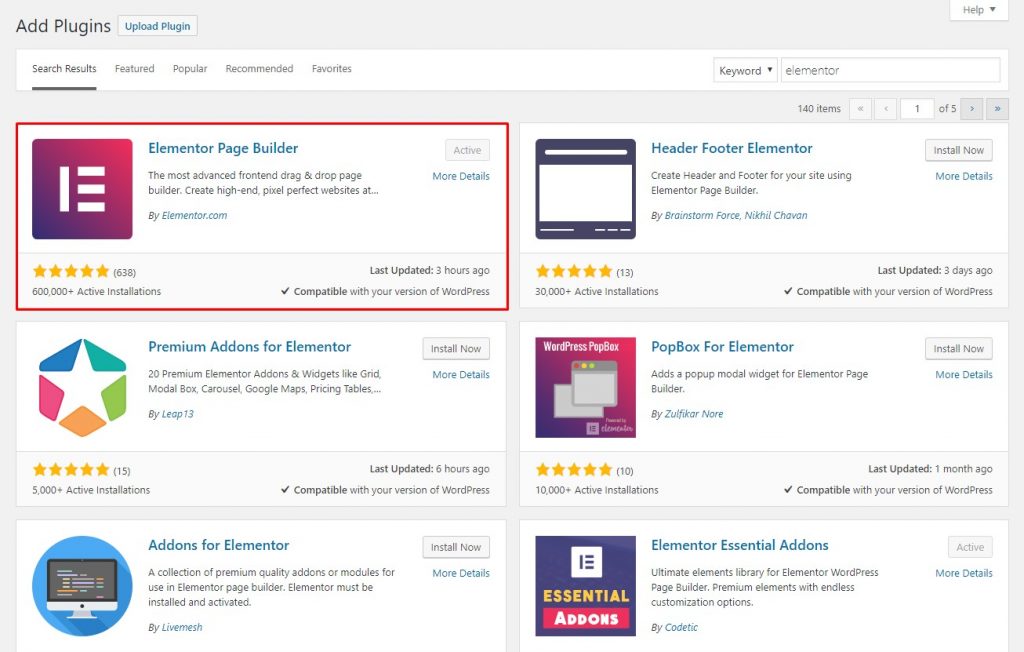
Install and activate it. Then you should see an “Edit With Elementor” button on the upper side of your blog post writing area. You need to click on it to see the Elementor live page builder.

Add A New Post

Now that you installed Elementor you will start seeing a new button.
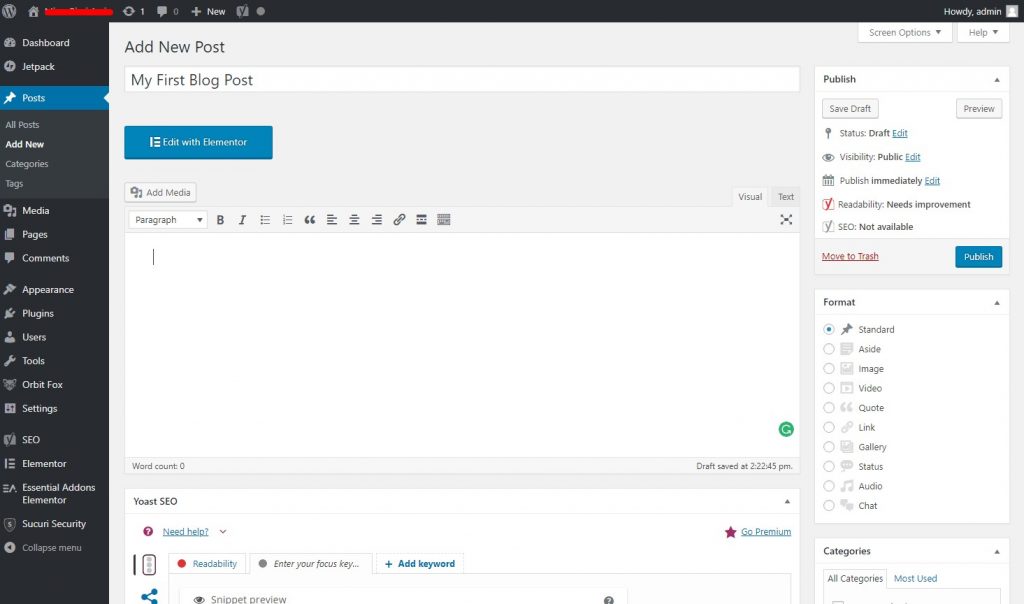
It will take you to the page builder which will enable you to create blog posts that are not just informative but at the same interactive.
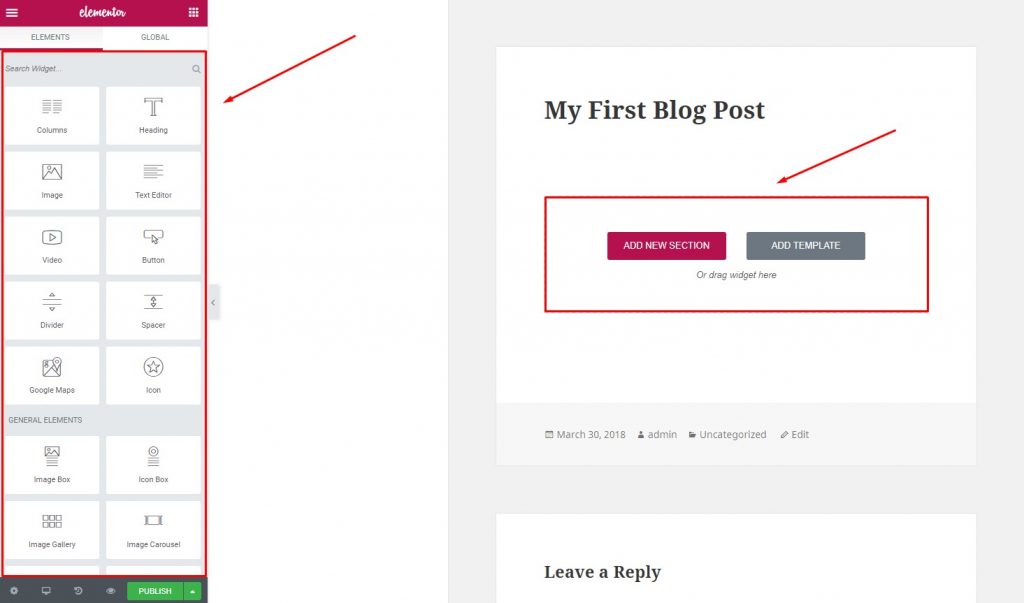
Here you will find all the elements(widgets for Elementor) that you will ever need. Popular columns include Video box, that will embed a video in your blog post with a single URL or an image carousel directly into the post. They are all drag and droppable so no technical knowledge needed.

Pre-built Pages Of Elementor

Now if you don’t want to create a post from scratch you can take advantage of the pre-built templates that come with it. There hundreds to choose from so you don’t have to think about running out templates any time soon.
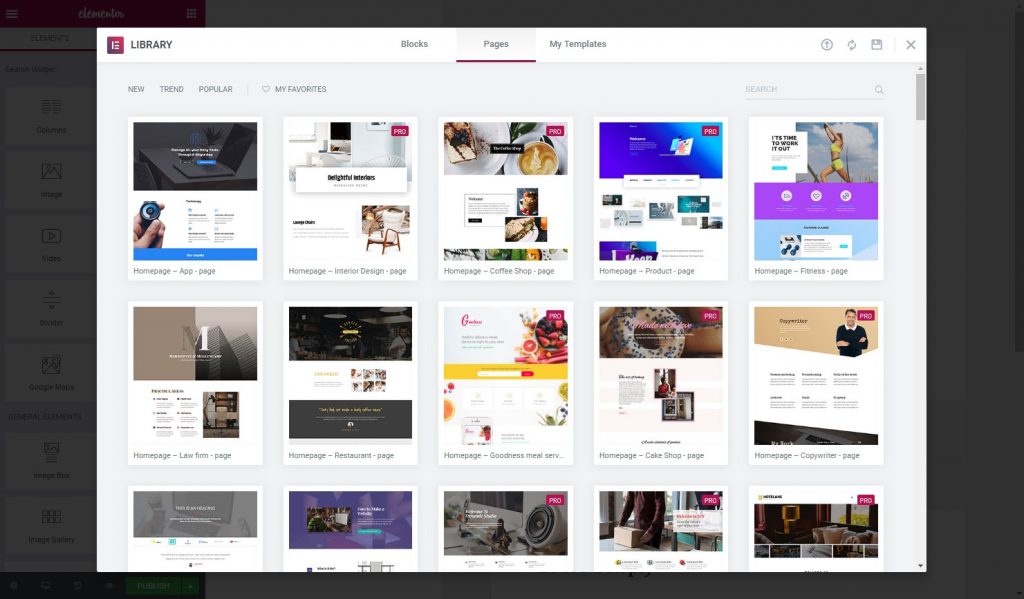
Blocks

Apart from pages, there are also multiple blocks pre-built that you can use. They can be added to any portion of your post. You can even customize them in any way you like.
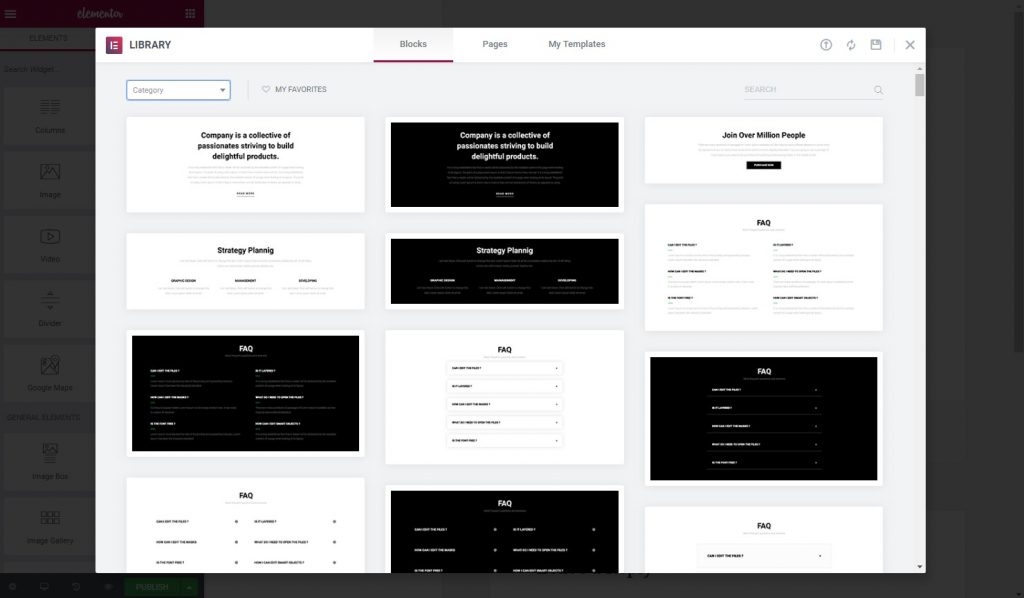
An Example

Here is a simple video that will help you to to create blog post templates that you will be able to use multiple times. It will help you to save time again and again.

We

We hope you will find this video informative to learn how you can create a blog post using Elementor.

Check Out What We Have To Offer

VoidCoders have been developing add-ons for Elementor for a long time now. Contact Form7 Widget For Elementor Page Builder which is an add-on(element) for Elementor that solves the problem of adding a form built with Contact Form 7 to your post.

If you are interested in any one of our product you can contact us directly here.
Why Elementor Page Builder Is The Best In The Market Right Now

The never-ending search for the best page builder. Don’t worry, we all have been there. And the internet is full of lists that claim to have the answer to this question.

Whether those people say Beaver Builder, PageBuilder by Site Origin, Divi Builder by Elegant Themes, Visual Composer by WPBakery or some other builder you have never heard about any of them doesn’t come close to the features you get in Elemenetor Page Builder!

The Reason For Choosing Elementor

Besides being the most featureful of the bunch it is also the easiest to use. It is a WYSIWYG type page builder that even the regular users can fully use.

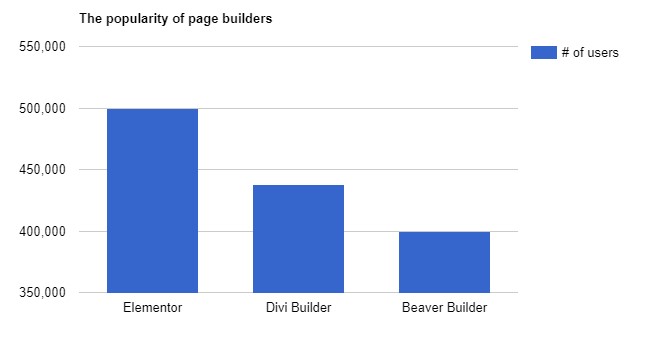
In the conquest to bring the most basic users to WordPress, Elementor is way ahead of the competition, inside the competitive market of the free plugins as well as in paid options. Just take a look at the statistics

Information courtesy of codeinwp

Features That Make Elementor Stand Out From The Rest

So exactly are the things we are talking about. Take a list of unique features that Elementor offers that is gonna bring you value and save all the hassle you might have faced otherwise.

In-Line Text Editing

The In-Line text editing feature with the Elementor Page Builder version 1.8 release. It introduces a very requested feature that the users always wanted.

Instead of writing on the left panel as the previous versions did In-Line text editing introduces editing directly on the page. This helps people when

  • writing a long post that left writing panel is just not sufficient for
  • they want to have a natural editing option
  • they want to see the complete page and tweak/change anything that comes to mind right away

Check out the official video

Support For 53 Official Elements

In layman terms, Elements are widgets for Elementor Page Builder. Most of them are free.

And also they are customizable to the fullest. You can change the color of certain button elements spacing inside a progress bar and the list goes on.

P.S There are elements that are only available only in the PRO version. But don’t worry.

Most of the useful elements that are sufficient enough for the day to day users are available completely free with the download.

Here’s a video we think will bring you value in understanding with the concept of elements and how they help you build a better page.

Support For Animated Headlines

Elementor Animated Headline is a PRO Elementor Page Builder widget. But it is well worth its price.

This element helps you to grab your users’ attention using highlighted, rotated and more creative ways of creating headlines. Don’t just think it is silly.  There are multiple pieces of research showing that using some kind of animation in text stretches the attention of the visitor by a significant amount.

It increases conversion rate, delivers the message in a more creative manner. It also the creates a long overdue break from reading all those long articles and make them more consumable.

Facebook Comments

Facebook engagements are getting harder each day. No matter what statistics you look at it is the truth.

That’s why Elemntor Page Builder made a Facebook Widget/Element to embed your user’s comments directly into your website.

The praises of your users, all their complaints will all be visible right from your site.

It brings a new level of authenticity using social proof to you and your business/organization. This can also bring more brand awareness and exposure following what other people are saying about you. There are other widgets related to Facebook that you can use for your site. Take a look at how they work from their official video

Ability To Directly Add CSS TO Module

Nobody knows what you are thinking. You might have the best design ideas in your head but are not able to implement them due to the constraints other tools have.

Not Elementor!

It has a custom CSS option so you can add your own custom CSS to pretty much everything on your website you can think of.

P.S. The only con of this feature is that it is only available only in the PRO version.

Every custom CSS that you add will be shown in real time directly on your page as you edit them.

Tell Us What You Think

Well, we went on all this time. Don’t worry we didn’t forget about you.

Tell us in the comments below what you think about this article.

If you think we missed anything or even if you completely disagree with us on this feel to let us know. We are always open to new things.

A little right hook: We also make Addons for Elemntor. You can check them out from here.

VoidCoders HTML Templates

Did you know you can use a VoidCoders HTML template as an addition to any website you’ve built? Well, that’s the whole point behind templates. Without further ado, let’s dive right into VoidCoders quality & unique HTML templates.

What to Expect in VoidCoders HTML Templates

Just to give you an idea of how much value a single template can deliver, let’s give an in-depth look at our Interior Design HTML Template.

The template is purposed for interior designers, decor or architecture business, and it comes forth with various advantages:

  • It has clean and creative elements to help add some spice into your interior business website
  • The template is multi-purpose, multi-niche suiting a range of niches  including: Construction, interior decor, transport, factory and furniture designers.
  • Possesses an easy to customize code

Features   

  • Has three different home versions, coming soon etc
  • Different color palettes
  • Different layouts
  • HTML+CSS3
  • Fully responsive layout
  • Cross Browser compatibility
  • Awesome fonts
  • Elegant Icon Font (360 + icons)
  • Powered with Bootstrap
  • Smooth Animation
  • Parallax Sections
  • Easy to set up Google Maps
  • Responsive video
  • Easy to follow comprehensive documentation

So, what would you consider if seeking a template for your website from a million options? Below are a few pointers:

  • Identify the general and desired features you’d like to see on your website
  • Determine your business niche and purpose
  • Identify a layout that fits your needs. Of course, it should be unique to allow your website’s design really stand out.
  • In a rapidly changing world, the template should have a set of customization options to allow make swift and rapid changes/improvements where and when needed
  • It sucks when things go wrong, right? Will anyone hear our help when things start going south? With a premium template especially, be sure that you can access 24/7 support.
  • There can be a trillion template options online, but it’s imperative that you choose one that combines a great design and usability. It should include- Accessibility, readability with easy to use interaction and navigation.
  • Compatibility with popular browsers e.g. Chrome, Mozilla, Safari etc
  • Elegant typography and font sizes play a huge role in the way customers/prospects perceive your business. Choose wisely.

VoidCoders smart templates aim at helping your customers interact with your brand with utmost ease. This is achieved through our HTML templates which combine great design and smart features resulting in professional designs with powerful functionality.

Elementor Accordion closed by default

Elementor is now called the # 1-page builder ( at the time I am writing this blog ). Surely it gives you features that will help you create a beautiful and professional website in matters of hours but there are certain things that users would like changed at some point. For example the Accordion widget!
I see people asking for a way to make the Accordion widget closed by default ( on Github, on support, on Facebook ).

So here are few solutions that might work for you if you are one of the ones who wants the Accordion closed.

Remember my method is without the need of using any plugin 🙂

Method 1: You can use Toggle Widget which is closed by default.

Method 2: If you insist on using Accordion Widget follow my video:

https://www.useloom.com/share/3896dc036a944ff68556b5ef354c0913

The code you need to insert:

<script> 
jQuery(document).ready(function($) { 
var delay = 100; setTimeout(function() { 
$('.elementor-tab-title').removeClass('elementor-active');
 $('.elementor-tab-content').css('display', 'none'); }, delay); 
}); 
</script>

I hope this helps you guys!

Again my method is without any plugins. If you are not comfortable with inserting code I suggest you look for some 3rd party plugin that can do this for you.

On a side note, learn how to create a free cloud website with Upcloud

Follow our blog for more tips and tricks on Elementor. If you are looking for some amazing Themes, Plugins check our list of Products

Elementor Custom Project

Elementor Custom Project, Elementor  Customization Service!

Elementor Plugin has taken over the page builder community since 2016 and still rising. It is so easy to use and beautiful to work with that almost everyone wants to use Elementor now. However, there are some cases when you need something which Elementor can’t achieve yet. So you would want a custom-made Elementor widget (Elementor Custom Project) that does what you want. ( Elementor Custom Project, Elementor Customization Service )

We have seen people asking around the question on the fact if Elementor Does the custom projects or helps them. I am afraid when you are a big company such as Elementor you can’t expect them to give their time for some custom project leaving their original work. The product is DIY, which means you must do whatever you want yourself. Elementor’s support team is very friendly and awesome but you can’t ask for any custom project and this is completely natural. So we got you covered for this type of projects 🙂

extending-elementor-button


Start A Blog In No Time Final Part

Well, here it comes! The final part of the “Start A Blog In No Time” series.

The previous parts were really welcomed by you guys. So we wanted to give you the most value possible with the final part.

Well, here goes nothing!

Guest Blogging

It is one of the untold secrets to get the most backlinks to your own blog.

But it is not as easy as it sounds. Nobody will let you just guest blog on their site for nothing.

You have to always maintain the 51/49 rule.

Always give more than you get

One simple trick you can follow is to go to Google.com and type in related keywords about guest blogging. This will result in the most relevant search results with the topic.

We recommend seeing the Kissmetrics blog to get a more in-detailed idea about guest blogging.

Click here to learn more

Look For The Underpriced Attention

Wel, it’s true that Facebook, Twitter, Google are the giants when it comes to best ROI for your marketing budget.

But it is also true that new platforms are emerging every day. Musical.ly, Twitch etc all are becoming more popular which was not even that known even six months ago.

There is an upside to this. These emerging platforms want to attain as much user as they want. For that they will give the best value for your money for their ad products compared to others.

Your best bet would be to use these underpriced attention as long as they are underpriced!!!

Hustle, Hustle, And Hustle

Well, let the truth be told. Nothing good ever comes easy. If you really want it you have to be at it 24/7/365.

Patience is the number one thing you should have when you want something. No matter what it is you have to trust the process.

 It takes time, hard work to build something you can be proud of

Always have the mentality to learn not just from the experienced but from everyone. Because when you stay humble and curious you start to listen. And when you start to listen you start executing. That is a very good strategy to have when it comes to anything in your life.

Thank You 🙂

It was a pleasure to provide you with some value we got from our own experiences. We know that this is not the perfect manual that will guarantee success in your blogging career.

But we just didn’t want to follow what others are already telling you.

Then what’s the point of you reading this?

As always feel free to comment down below with any questions you might have.  Whatever it is!

WordPress, blogging even life in general.