WordPress History and the Continuity of WordPress

Whether you are new to WordPress or have been using it from the beginning, you know how important it is to the web 2.0 and the new ones to come. So that’s why we wanted to take you down the memory lane on the history of the WordPress.

WordPress history, WordPress is the new era of mania and WordPress history and the continuity of it

Is it the new era of mania, isn’t it?

WordPress, the new era mania is powering over 90% of all websites though it is open source and free of cost.  Therefore will create a lot of questions in your mind alike-

  • Who owns WordPress?
  • When did WordPress start?
  • Who created WordPress?

Along with these questions, you will get the answers and will rush to install WordPress and work on it. But at first we have to know WordPress history.

WordPress Beginning History

WordPress is software aimed at ease of use, emphasizing accessibility, security, performance. Anyone can able to blog and build their own sites so valuable for earning as well as social works.

Thus WordPress makes your site inclusive through WordPress powerful features.

Now the analyzing of WordPress history will reply your questions. Who have created WordPress answers for the legends Mike Little and Matt Mullenweg from 2003? With all efforts, this WordPress now has been licensed under the GPLv2 and made on PHP and MySQL and turned this software to number one Content Management System (CMS). It also makes available four core freedoms and they are:

  • 1st Core Freedom: To carry on the program for any resolution.
  • 2nd Core Freedom: To change the program as your demand and the study that the program how acts.
  • 3rd Core Freedom: To restructure.
  • 4th Core Freedom: Reformed versions copies are to distribute to others.
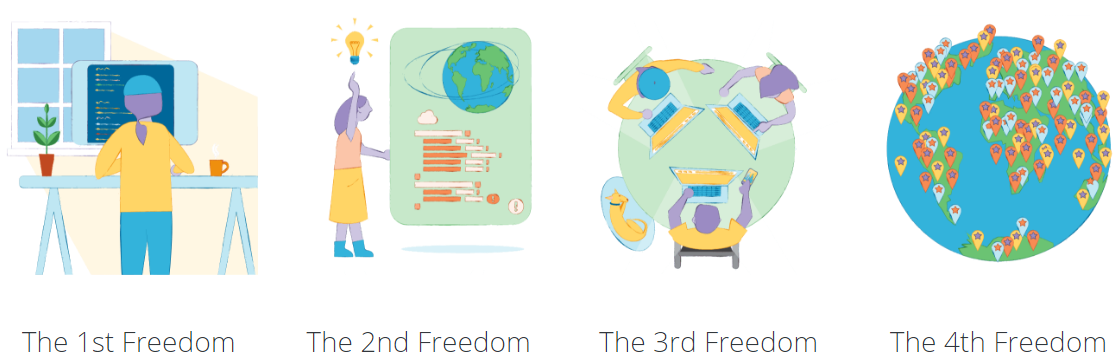
These four core freedoms are pondered as WordPress Bill of Rights.

With all exclusive features, it lets web developers and bloggers explore and be skilled in web developing the world.

The Continuity of WordPress

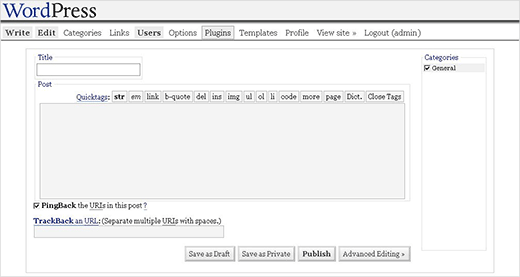
Mike Little and Matt Mullenweg, two users of b2/cafelog decided to build a new platform based on b2/cafelog and named it WordPress.
WordPress 1.1
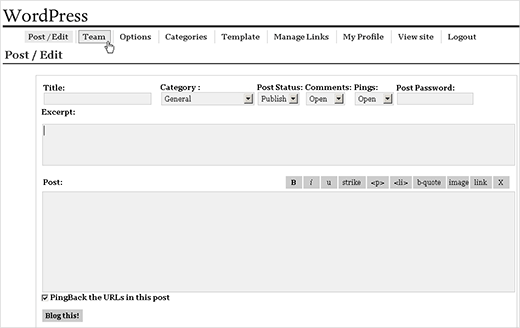
On May 27, 2003, Matt publicized the availability of WordPress 1.1. Features of this version-

  • Produced XHTML 1.1 yielding templates
  • New templates
  • Paperwork interface

WordPress 1.2

In May 2004, WordPress 1.2 had been published with extra functions and better than before. The new features of this version are-

  • Writing and sharing with all community through WordPress plugins
  • New license term added up

WordPress 1.5
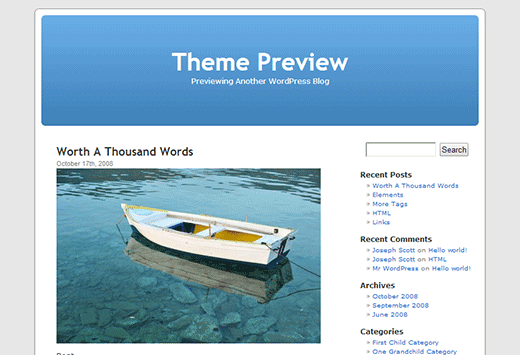
By the passage of time, WordPress had been moved forward with updating version WordPress 1.5. The numeric features of this version-

  • New theme system
  • Pages publishing and comments control tools
  • A weblog can run through the single folder

WordPress 2.0

WordPress 2.0 was running better and getting improved feedbacks from the web developers, bloggers. It had another new feature like-

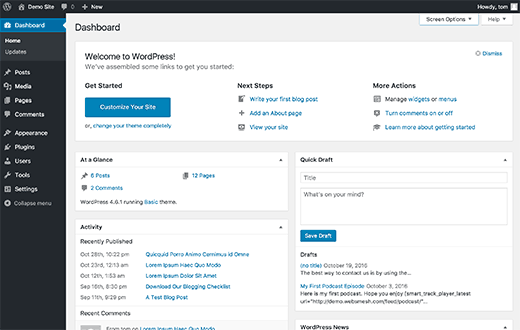
  • New admin dashboard
  • For avoiding loading pages of users, it let JavaScript and DHTML for user edge
  • Tags posts and add categories
  • Database backup plugin Akismet installed and Function.PHP file in 2007
  • Automattic the filed trademark logo for WordPress registration had been included
  • One click updates, built-in installation, and shortcodes had been invented in 2008 by the conjoined of Happy Cog

WordPress 3.5

On June 17, 2010, WordPress stepped forward to CMS. With a view to making it more flexible and easier for everyone, it had comprised some other structures as well as-

  • Custom taxonomies
  • Custom post types
  • Header, footer and menus functions
  • Post formats and admin bars had been created in 2011
  • In 2012, theme previews, theme customizer, and new media manager were introduced

WordPress 3.7

WordPress 3.7 published in 2013 with some of the automatic systems corresponding to-

  • Minor releases for software and
  • automatic updates of software

WordPress 3.8
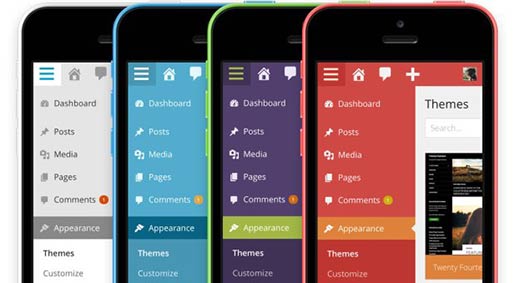
Again in 2013, WordPress 3.8 had been issued. The new features of this version were-

  • MP6: It is a new organization interface for WordPress 3.8. It is responsive for users and on screen size or any device. Anyone could have host-controlled their own sites and also can order the system for any kind of uses.

WordPress 3.9

Image result for WordPress 3.9

In 2014, WordPress 3.9 was released. This issue focused on-

  • Live widget previews
  • Visual post editor
  • Drag and drop function
  • Image add and editing

WordPress 4.9.5

WordPress 4.9.5 is available and currently using over the world by bloggers and web developers. It has some strong and easy features which make users fun while using it. The toolkits of this version are-

  • Let use a domain name and users can create it by themselves
  • Colorful maps, graphs, pies are available for design your own page
  • Responsive themes and control by mobile at anywhere
  • Forums to questions and answers, live chats for pages and relaxed admin control  

WordPress 5.0: The latest edition
The latest edition of WordPress 5.0, the most unique version of WordPress than ever before.

The latest versions’ latest features are-

  • Distinctive content identifier: it can easily compare the unique contents and duplicate contents.
  • Push notification as a built-in characteristic
  • Dotnet one core support: Developers can subsidize plugins for WordPress.
  • App broadcast: open source app client can contribute to WordPress websites, android tab app, and iPad app.

Every plugin are upgraded with compatible with WordPress 5.0

WordPress is the software which has improved the lifestyle of bloggers and web developers and has become responsive to decreasing unemployment rate. Thus recently all operators are getting benefits and hence for the available and harmonious sorts, it has identified the number 1 CMS worldwide indeed.

Create a marketplace in WordPress using WooCommerce

How to create a marketplace in WordPress using WooCommerce?

Have you learned how to use WordPress? It’s time to show you how to earn money through WordPress using WooCommerce.

For breeding your knowledge as well as grossing money you have to know about WooCommerce. Therefore we are going to discuss it at first!

Let’s say WooCommerce is like WOW! 

You may think why WooCommerce is WOW! It’s an assurance that you are going to feel that when you are done reading this post.

The best eCommerce plugin WooCommerce is free for WordPress. It has some special characteristics that will ensure you why do you use this plugin online business component and they are:

  • Best corporate arms only for WordPress
  • Automatic accessible features as extensions that make you feel in good hands and thus help you on SEO and marketing organs
  • You can control 100% data of your eCommerce through mobile devices
  • Easy run and install of WooCommerce and post and sell without having any coding knowledge.


       WooCommerce has available features:

  • Show product ratings, reviews and sells: Affiliate, digital and physical products are shown on product pages with a “Verified Owner” marker. It also has coupons on occasional online shopping. Thus making online shopping it can create themes, templates and thus all of them are in the storefront.
  • Attributes, tags, and categories: For finding out a product for customers easily, includes size and color tags.
  • Enhance images and videos: Unlimited products images and videos are available to attract customers also with WordPress WooCommerce themes.  
  • Conduct customers and orders: Customers accounts and visitor checkouts through cash on delivery, PayPal, direct bank transfer and credit cards for products are available with one click.
  • Customize location and shipping option: With currency and quantity units, can customize your store location and check the option for shipping based on purchasers’ location.


Hence it is clear that WooCommerce is the best ever free plugins for WordPress. Install it and make your site awesome for product sell. Further WooCommerce reviews are available on Google WooCommerce.com. 

WordPress and WooCommerce Multi-Vendor Plugins

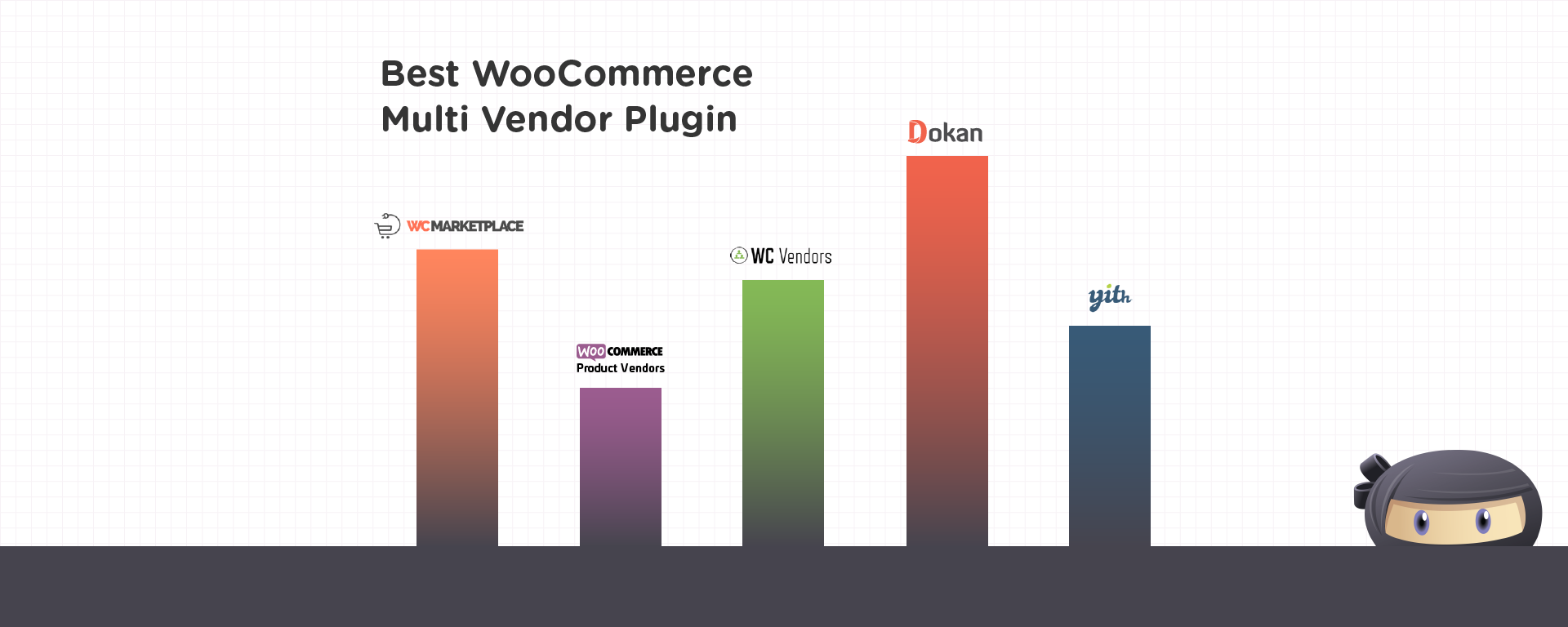
There are numeric of the multi-vendor plugin of WooCommerce which are generally used for building up a website rather for creating ambitious and enthusiast entrepreneurs.

Which makes WordPress the number 1 CMS in the world, do you have any idea? WordPress creates a huge number of websites for online shopping and create a marketplace with its powerful plugins. The plugins which widening WordPress popularity are here.

                              Plugins Name

                    Activities

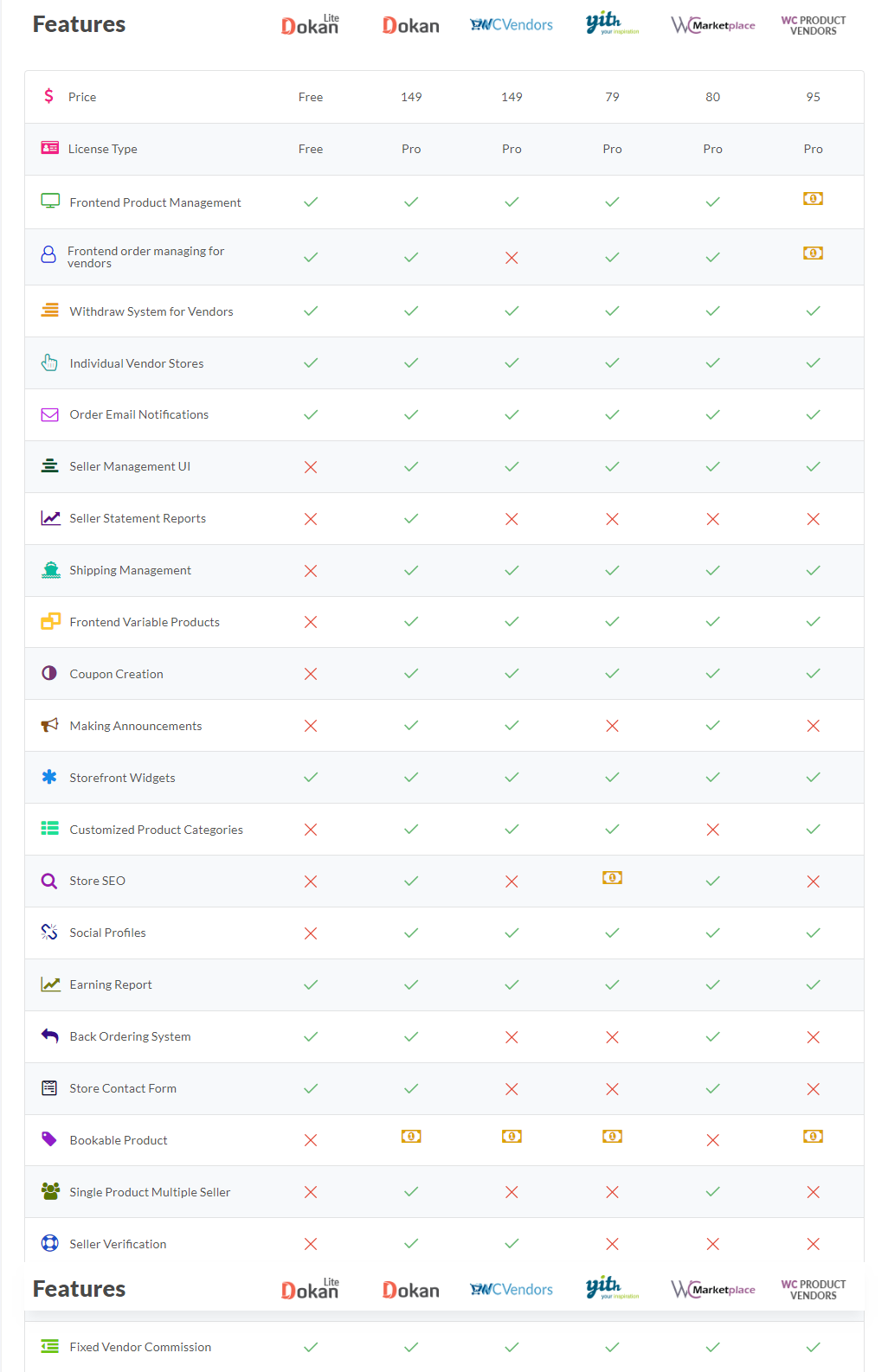
Dokan Multivendor Marketplace If you want to cut out your own eBay, Shopify or Amazon marketplace within just 30 minutes, Dokan Multivendor Marketplace is the best option. It has a figure of premium modules, features, and designs for generating a website.
WooCommerce Dokan Vendors With its last update, it has been included a lot of features. The main fact, it is active as on the back end of the site. An extra front end addon can capable it to work on the front end.
WC Marketplace It is another popular eCommerce multi plugin. It has some special features as well as paid off through PayPal and Stripe with withdrawal request and scheduling of payments, additional options, and personal control
WC Vendors Pro You can choose this one if you have a tight budget and want minimum features for creating a marketplace. It supports unique marketing strategy with low cost.
YITH Multivendor Like WooCommerce Dokan Vendors, it has no front end addon. But it has been popular with its unique feature “Downloadable Products”. Any customers can buy products and pay the sellers with their commissions

There are other features and compatibility of numeric multi-vendor plugins.

WordPress + WooCommerce= Create a Marketplace

Can WordPress be the site for making marketplace? Yes, it can be.

Let’s have a look at the steps that how WordPress turns into a marketplace. If you are a newbie, need to install WC Vendors.

Requirements for Creating a Marketplace:


  • Right website platforms like WordPress.org and WordPress.com
  • For self-hosted WordPress you need- marketplace addon, domain name, WooCommerce plugin and SSL certificate.


So let’s get started after the setup.

1st Step: Establish eCommerce platform

To set up eCommerce platform, you need a web hosting account and domain name. After this basic the Bluehost which will offer a free domain, discounts, and SSL for WooCommerce and WordPress hosting.

Bluehost offers for domain name cost $14.99 per year and SSL costs $69.99 per year. It has a discount which will cost $6.95 per month.

Now you have WooCommerce and WordPress have installed on PC.

2nd Step: Attempt to WooCommerce to Online Marketplace through WC Vendors

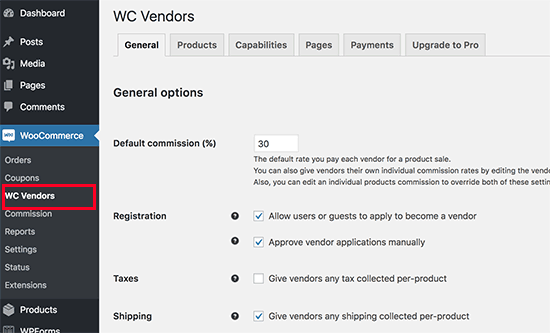
First, install WC Vendors plugin. Then click on the WooCommerce> turn on WC Vendors page.

WC Vendors settings

With a view to paying each vendor, head over to General> commission rate> save general changes.

After mode on WooCommerce plugin, you will see other headings and their functions.

  • Products: You can add new products by the categories and hide items when adding up a new one.

Configure products settings for vendors

  • Capabilities: For order permissions and run capabilities of WC Vendors, hit it off on capabilities.

WC Vendors capabilities

  • Pages: For shop settings, vendors’ terms and orders page head over pages. You have to affix with terms and conditions for online shopping and form a terms page.

Setting up vendor pages

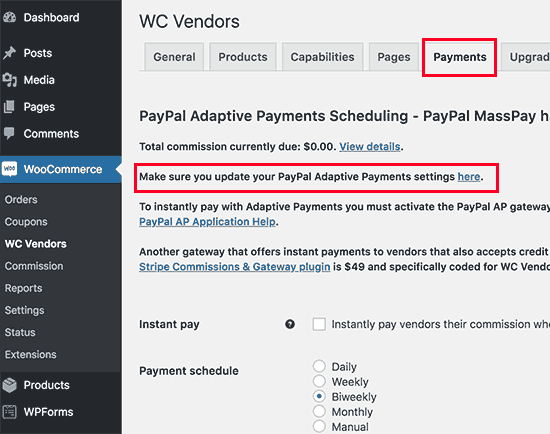
  • Payments: Click on payments and pay instant and get payment schedule with default withdrawal request.

3rd Step: Assist Account Management

Click WooCommerce> Settings, you will see,

  • My account page: For personal control use my account page option overall data.
  • Customer registration: For selling items to customers and their safety registration use customers’ registration option.
  • Login: For further shopping of customers let them save register and personal information.
  • Account creation: Customers can easily create their account, save information and passwords through this option.

Enable customer registration in WooCommerce


4th Step: Found Navigation Menus

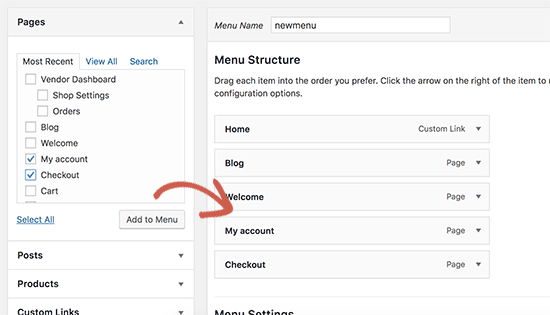
Facilitating customers to find out your site without difficulties, visit Appearance> Menus page. Conjoin checkout pages and user account to Navigation Menu.

The uncertainty you do not have my account, add shortcodes in the post copyreader and construct a new page on WordPress and “Save Button”.

5th Step: Testing Marketplace Website

By clicking on the header link “My Account”, create a new account and visit owned website with browsers. All others you have to do-

  • Allow customers to create their account for online shopping
  • Info should be registered on the clients account certainly and make them compatible with your site
  • Beget notified clients of emails for happy shopping
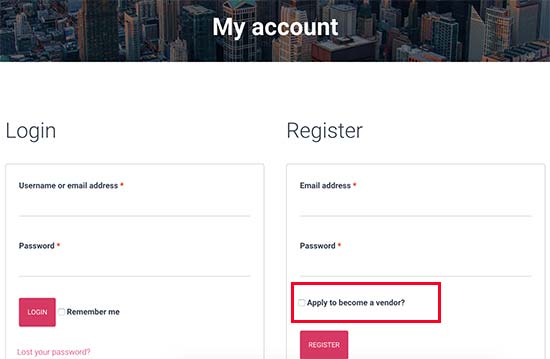
  • Accept or deny vendors requests by visiting their username.

Yet you are confused to install WordPress and WooCommerce plugins? Hope you are not.

The proverb says, ‘money is what money does’. Definitely, WordPress and WooCommerce are the simplest and most compatible elements for SEO and accessible business, where you can earn money with own benefits. These will create a marketplace, in addition, your fame in this industry if you are able to ensure patrons happy online shopping indeed.

Let us know if you have questions! We’d love to help.

WordPress and Search Engine Optimization

Searching for the best CMS for SEO Powerhouse and Friendly Content?

WordPress is the master of Search Engine Optimization (SEO) powerhouse and creating creative content.

Do you know what is WordPress, why it is the best and how does it work? Let’s have an overview of it though we have discussed the major update in new WordPress 5.0.

What is WordPress?

wordspress

The uncertainty you want to do SEO friendly and to have fresh content optimization power, you have to plug in WordPress 5.0 which is now experiencing the web page builder in the game of SEO. With a view to putting forward in the SEO game, the best CMS ever in the world is the only one WordPress. Other characteristics of WordPress are-

  • For running on a server and to install WordPress is with free of cost indeed.

  • It has premium themes which all totally cost $18 if you want to out website through WordPress.com. Bluehost or Siteground offers users 60% off their lay on prices to web lay on and domain uses.
  • For filling up your imagination, WordPress can be used by way of the blog though it has been advanced with such content supervision like plugins, themes, templates and widgets and so others.

There exist other blogging platforms identical- WordPress.com, Blogger, Wix, Tumbler, Joomla, Ghost and etc. But the fact is that WordPress is better than other platforms with a view to offering beginners with compatible features and encourage to build up own website.

Why WordPress?

Beginners query why to practice on WordPress or why must switch to WordPress. Look beyond answers.

  • WordPress is unrestricted as in freedom. It is flexible too and compatible to absorb powers of other plugins about 22.5% including in a recent survey.
  • Easy to manage.
  • Informal to setup with other plugins and crisscross http://www.wpbeginner.com/free-wordpress-blog-setup/

Including this contiguity individualizes, WordPress is a riot with other facilities for the beginners and the old website builders and these are:

Search Engine Optimization (SEO) Powerhouse

As we have explained that why you firstly choose WordPress and that is for Search Engine Optimization (SEO) friendly. Favors to on-page SEO, it refers to other significant elements.

    Elements                                                                  Significant Works
Label Tags and Headings The title which is wrapped in H1 tags. Along with other heading tags, WordPress permits Google to help to find such information and lets HTML tags.
Easy content Together with multimedia content such as images and videos, WordPress creates always high superiority content that has made not ever before.
Suitable HTML Markup Regularly in PHP, WordPress forms HTML pages for quest engines. The latest generation of themes like Genesis has been helped HTML5 page.
SEO Responsive Permalinks WordPress has the facility to set up links which are known as Permalinks. Through this search engines and site visitors can realize what they are searching for.
Plenty of SEO Plugins Including themes and template library, WordPress creates the compatibility with riot plugins like Elementor, WPBakery and so on which will help to design and form friendly SEO. Check this thread https://www.monsterinsights.com/
Mobile Optimization Including All Browsers E-browser, Opera, UC browser and others can be used as doing on-page SEO.

Security Issue

One should not suffer from security confusion problem for having such top-notch security of WordPress. It has built such security shield that will avoid your site from hacking and spamming. If a susceptibility is being detected, WordPress Security Team will send a security to bring up-to-date instantly. Moreover, it has-

  • Systematic software updates: Gradually updates security system and along with software.
  • The solid observer for malware:

WordPress works as security observer for malware. Check this https://codex.wordpress.org/WordPress_Backups

  • Vigorous password protection:

WordPress protects data and other software through a password.

  • SSL certificate protection:

For protecting individual data and secure hollows layer SSL is a security ranking technology by Google.

Ways to Manage Content

For making business or breaking others, WordPress content has a forceful contribution. Besides this-

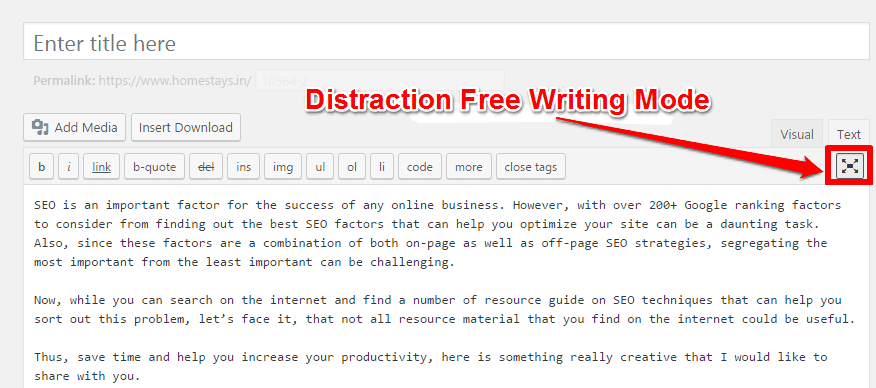
  • Disruption-free writing mode:

Bloggers and authors can easily write on WordPress without disruption. It makes fluency and creativity.

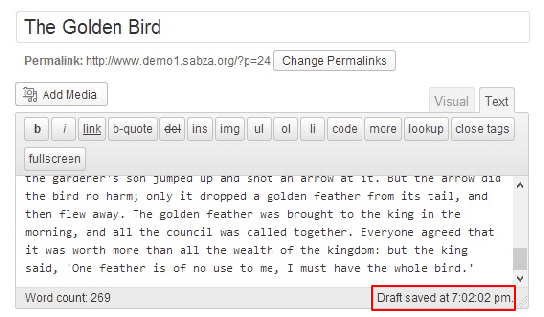
  • Saves content as draft: After writing if you don’t want to publish immediately, press on the left button on the side of publishing icon.
  • Automatic save preference as text or as visual:

Writing on the WordPress as visual or as text, save them as a draft or publish it as contains.

  • Publish only clicking on “Publish” icon:

Subsequently writing, publish by clicking on Publish icon.

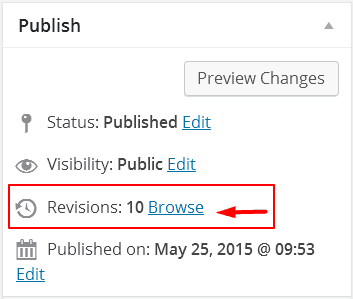
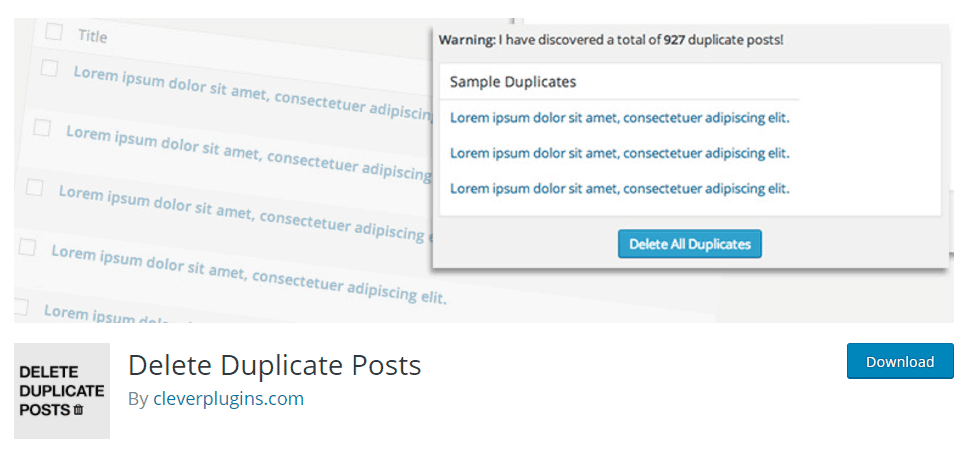
  • Filters replica content:

WordPress always filters Meta tags, contents, title, and others to create a high-quality content.

  • Customize option for post editing:

Some of WordPress customize editors are- CKEditor for WordPress and Pods-Custom Content Types and fields.

Extendable Via Themes and Plugins

WordPress has some other themes and plugins which will help to secure website and feeds and let design individually the contents and templates, widgets and themes.

                    Titles         Designs and Flexibility
Free themes With tons of free themes design your websites such as Twenty sixteen and Twenty Seventeen.
Single admin panel Feel free to host your website single as per WordPress account has Single Admin Panel option.
Back-end The back-end is the administration panel of WordPress which is enabled for comparing the other contents with own ones.
Irrelevant for HTML editing Neither it expresses HTML editing irrelevant nor FTP software.
Relax synchronization Synchronize with third-party integration plugins. Moreover, you can send your emails to the customers through MailChimp.
Drag and drop As for including the images and videos and thus adjust them in the content use WordPress drag and drop option.
Disable and enable the option While using a lots plugins can hang PC. So WordPress has the disable option to disable such plugin and enable the option for switching to another.
RSS feed It services as to subscribe own blogs easily and to customize functions.
Sidebars and footers Customized sidebars and footers allow design own website.

Monetization

Earning money through WordPress has now become so easy whenever it expressed itself as from not only as blog belong but also as SEO Powerhouse.

  • Google AdSense Display:

For getting paid process, by users press on ads.

  • By Flipping Websites:

After knowing the demanded websites, build website> get traffic> sell it.

  • WordPress Plugin for Sell Advertise Directly:

Instead of using Google AdSense, put a jiff code to website> have agreement and terms> negotiate pricing> sell ads and banners directly.

  • WordPress Associate Marketing:

Build web page, by customers for recommended products, get commission and earn money like from Amazon, ShareASale and Commission Junction.

  • Through Sponsored Blog Posts:

publish sponsored posts> comply FTC’s Endorsement Guides.

Speedy and Efficient

After installing WordPress plugin, use images to speed up WordPress. Even after that if you want to speed up more and unable to do that step, do these-

  • Always keep WordPress site on keep informed.
  • Use faster slide or faster gallery.
  • Content delivery network open and divided comments into pages.

These will add SEO in innovative form and monetization will be so laidback and sooner than before.

Social Media Digestion

  • Forecast post:

Through media plugins like Microblog Poster and CoSchedule can straightforwardly forecast blog posts directly.  

  • Comfortable to share on the community podium: Increasing utmost credibility, the plugin Yoast SEO provides the facility to comfortable to share on the community podium with one click.
  • Community bookmarking and input buttons:

Another solitary unit is this. This can increase ROI and more traffic in the site. It also allows community bookmarking in one tab and input buttons in another.

eCommerce Resolution

Through WordPress most developed eCommerce plugin WooCommerce, generate store and publish advertises and sell them. Thus the eCommerce is developing and has become popular through WordPress.

Generate Multi Language Website

WordPress is better than any other CMS for it’s another wonderful feature and that is, it can generate multi-language. From own language, WordPress can transform the language into 70 different languages. Install WPL or PolyLang Plugin or TranslatePress for translate the website elements.

Hope you are not still worried about install WordPress and Write on it.

Hence, don’t be late. Grab WordPress with the intuitive features which no other CMS have ever been. Earn money through blogging and SEO making.

Happy SEO constructing along with blogging!

Build Header & Footer with Elementor 2.0 Pro | The theme builder

[vc_row][vc_column][vc_column_text]

Build Header & Footer with Elementor 2.0 Pro | The theme builder

Elementor has just released their ultimate weapon the theme builder which is a part of their Pro version yesterday! and I must say I am impressed by the performance, the usability and the different conditions that you can set !

Without further delay let me show you how you can make header footer of your own now with Elementor 2.0 Pro or what they call the Elementor Themer / Elementor Theme builder!


[/vc_column_text][vc_video link=”https://www.youtube.com/watch?v=MkCpcqNh9Nw” css_animation=”bounceIn”][/vc_column][/vc_row]

Top Five Free Elementor Add-ons You Should Definitely Use

Top five this, top five that. We thought why not a top five Elementor add-on plugin.

Elementor is one of the most popular page builder plugin available in the market right now, if not the best in the bunch. With it’s vast array of features such as inline editing, 53+ official elements(Elementor term for widgets) and more it easily lefts the competition behind in functionality.

What Are Elementor Add-ons

Where Elementor really shines(and WordPress in general) is that the opensource nature of it provides other developers with the chance to create a great plugin that extends the capabilities of Elementor even more.

If they don’t like something or want to add some new feature, they have the option to do in the form of creating an add-on plugin.

In this blog, we will be discussing the top five must add-on plugin that you should if you are using Elementor as you default page builder. so let’s get right into it.

Note: The add-ons we listed are both free and premium options. We just wanted to let you know what will give you the best bang for your time

Elemailer – Drag & Drop email designer with Elementor

We all love Elementor for its interface and flexibility, don’t we? Many times we also thought personally wouldn’t it be great if we could design our email with Elementor! Now it’s possible with Elemailer. The Elemailer lite which is free to use gives you a system to design email template for Elementor pro form, Contact form 7 and more. The paid version gives you Newsletter, Marketing system with Elementor builder.
Free Elementor Email designer – Elemailer Lite

Newsletter, Subscriber, WooCommerce Email design with Elementor- Elemailer

email design with Elementor
Design Emails with Elementor in WordPress

Elementor Addons & Templates – Sizzify Lite

If you should choose any one of these five it has to be this. We mean 20,000+ people couldn’t be wrong right.

It is built by the good folks over at Themelsle. It adds a significant amount of Elements in your library that you can choose from right after installation.

But where it really outperforms all the other one is by its WooCommerce specific Elements. It adds a Product category, Recent products, Best selling product, Popular products, Featured products elements to the list which are extremely helpful for all the marketplace owners out. Who wants to provide a different kind of user interface to their customers.

Check out more from this video

WordPress Store Link: Elementor Addons & Templates – Sizzify Lite

Press ElementsPress Elements – Widgets for Elementor

Press Elements is an extremely popular plugin with over 10,000+ active installing. Meaning more than ten thousand people find it useful.

It adds multiple elements to three categories. In the free version, you will get

Site Elements

General site related components integrated into WordPress.

  • Title – The name of the site.
  • Description – The tagline.
  • Logo – Custom site logo.
  • Counters – General site stats for Post Types, Taxonomies, Comments and Users.

Post Elements

Post related components based on WordPress theme architecture.

  • Title – The title of the post.
  • Excerpt – A short description.
  • Date – Publish date or last modified date.
  • Author – The post author information.
  • Terms – The taxonomies assigned to the post.
  • Featured Image – An image assigned to the post.
  • Custom Field (Pro) – Extra information saved as WordPress meta-data.
  • Comments – The default Comments Template included in the theme

There is also a PRO version that comes with more features such as effects, integration to 3rd party services that are supported by Elementor and more.

Learn more from here.

Contact Form 7 Widget For Elementor

We are not gonna lie. This is one of our most popular plugins to date. With 10000+ users currently using it, surely it is worth your time.

It is also FREE to get started. What it primarily does that it eliminates all the complicated process of inserting forms created using Contact Form 7 to your Elementor post. By adding an element to your widget library so you can select your form using a simple drop-down menu.

Read this to get an in-depth idea.

We mean why wouldn’t be in the top five free elementor add-ons list.

Plugin-Post Grid Add-On For Elementor

Ever saw those beautiful websites with all those pictures in grid view. Whether it be a traveler showing all the places he/she visited or an artists portfolio grid view comes very handy for this situations.

We thought why not make a plugin for that and even better make it COMPLETELY FREE. This plugin will give you grid layout, list layout, minimal grid, first big post then grid, first big post then list option.

You even have the options to control everything. Check out this page to see if are convinced you need this.

Orbit Fox by ThemeIsle

Number five on our list of top free Elementor add-ons is Orbit Fox by ThemeIsle. This is an odd-ball here. According to their self-introduction they are calling it a swiss knife plugin. Well, that’s not exactly wrong. It adds various modules to your existing theme including social media sharing button, Google Analytics, page builder add-ons etc.

Heard that last part! Yes, we are talking about Elementor elements.

Tell Us What You Think

Well, there you have it. Our top picks for the best Elementor add-ons that are gonna bring the most value to you. These ones are regualrly updated so you shouldn’t face any issue when trying them out on your site.

Let us know if you found them helpful or you think the list is missing something.

We are all ears!