Reasons Why WordPress is the Best CMS for SEO

wordpress
Source: Unsplash

Nearly two decades since its initial roll-out, WordPress evolved from a simple platform for bloggers into a household name in website development.

In 2021, 455 million websites were built on WordPress, representing a 37% market share of all global websites and a 62% market share of all CMS platforms.

Moreover, WordPress powers 38% of the world’s most visited websites and registers over two million new domains every year.

But the leading CMS platform doesn’t owe its success to pure luck or poor competition. Instead, WordPress’s popularity lies in its ease of use, customizability, affordability, and SEO-friendliness, among other benefits.

In this article, we’re focusing on the correlation between WordPress and search engine optimization. 

Read on to discover six ways in which WordPress benefits your website’s search rankings.

#1 WordPress Provides Good UX on Both Ends of the Spectrum

ThemeForest, one of the leading websites for downloading WP themes, contains over 11,000 different WordPress templates. 

And while designs, niches, and features vary, most of these themes have one thing in common – they all adhere to UX best practices.

The bulk of WordPress themes is created by professional designers who understand the rules of intuitive, user-friendly, and optimized web design. 

Take a closer look, and you’ll see that the majority of the designs are pretty simple and similar, donning:

  • A menu bar with drop-down links for navigation
  • An above-the-fold section with an image and a CTA
  • Typical web pages such as about us, contact us, services and blog
  • A footer with social buttons, sitemap, privacy and cookie policy, and contact information
  • A contact and email signup forms

WordPress themes don’t have identical elements because designers copy each other or don’t know which features to add – they’re alike because these elements are pretty much everything users need for a site. 

Simplicity coupled with functionality makes WordPress themes so successful in achieving a great user experience. 

Good UX implies users stay longer on a site, visit more pages, bounce less, and are keener on becoming a customer.

So, WordPress provides site elements tailored to maximize user experience, but what about the other end of the spectrum?

Well, WordPress, as a platform, is an embodiment of simplicity in the world of web design and development. Business owners can create a website without any coding knowledge, customize sections using a drag-and-drop feature, and brand their site in only a few clicks.

But the CMS platform has a rather straightforward dashboard as well. For example, the WordPress dashboard allows you to manage content, install SEO plugins, add alt text and meta descriptions, perform updates, etc. 

So, WordPress offers you a website creator which features a UX-friendly basis to create an even more user-friendly website. 

Therefore, choosing WordPress to build your website is a win-win situation for you and your website visitors.

#2 WordPress Websites Are Lightweight & Fast Loading 

Page speed is one of the most significant Google ranking factors – but it’s not the only loading speed that’s taken into account. 

Google now measures the time between a user’s input and the site’s feedback, the time until complete page load, and the time necessary for all page elements to load and become stable.

So, yeah, website speed is a rather vital ranking signal. One reason for its huge significance is that slow load times often nudge users to leave your page. A long wait for a page to load increases the bounce rate, signaling Google your site is of low quality and value to users. 

On the other hand, Google can’t risk giving good rankings to websites with poor UX, as users might grow unsatisfied with the search engine’s services and turn to another platform.

Website speed is a crucial element during the search engine’s crawling efforts. Namely, the faster the site, the quicker can the search engine crawl and index it appropriately.

Luckily for all WordPress buffs, most free and premium WP themes are developed to load fast. Moreover, WordPress templates are generally responsive, ticking the mobile-friendliness box as well.

Additionally, members of the WordPress community have developed numerous plugins you can download to help improve your site’s speed. 

WordPress themes are generally lightweight and fast. So, if your WP website is slow, make sure to check some common reasons for poor speed performance, such as unoptimized images, too many plugins, or bad hosting.

#3 WordPress Allows Automatic Integration of Metadata 

In WordPress, metadata refers to the information about your site’s posts, pages, users, comments, and other website elements. The term also refers to page data that appears in search results, like the title and short description.

Metadata helps search engine bots understand what your pages are about. That’s why it’s a common SEO practice to include targeted keywords across metadata to help improve site rankings.

And while the SEO title and the meta description are major ranking factors, adding keywords to metadata isn’t significant to search bots alone. 

Namely, when users search a query, the keywords appear bolded on a search results page. So, if your title and meta description incorporate a keyword that the user has searched for, your result will be more visually prominent, thus boosting your CTR.

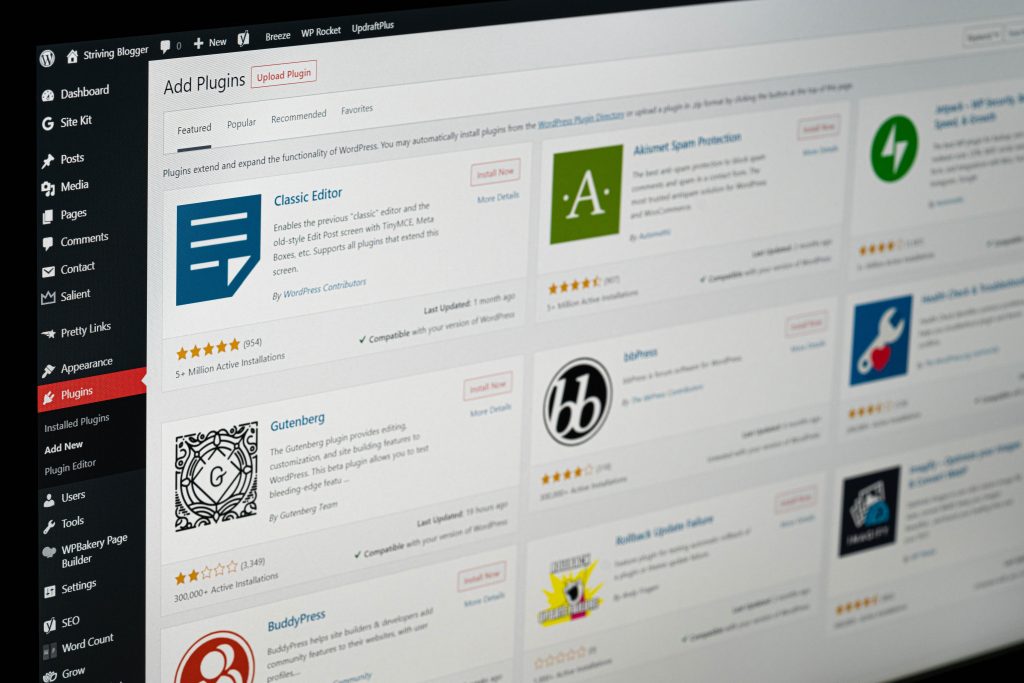
WordPress makes optimizing titles and meta descriptions really easy with Yoast and All in One SEO plugins. These plugins allow you to add metadata and provide recommendations for improvements. 

You can manually input your metadata, but the plugins can fetch the information from your content if you forget to add them.
plugins
Source: Unsplash

#4 WordPress Allows Customizable & Clean Permalinks

Permalinks are basically the URLs on your website. While they’re not a major ranking factor, optimized links help bots and users understand and engage with your page.

Unlike some other website-building platforms, WordPress settings allow you to edit your permalinks easily. You can customize the site links to include keywords, thus assisting the search engines and your visitors figure out the topic of your article.

But the customizability of permalinks isn’t crucial only because keywords in the link are an important ranking factor. 

Users aren’t keen on clicking suspicious-looking links – for example, those with random characters, numbers, or symbols. This is because such links look like spam or viruses, and most users will stray away from clicking on those. 

On the other hand, clean permalinks can increase the CTR of your posts on the search engines. So, customizing and optimizing your website’s permalinks is a much better approach to boosting traffic and search rankings.

#5 WordPress Enables Integrations with Numerous Web Platforms

Choosing the world’s most popular CMS comes with another SEO perk – cross-platform integration.

Connecting your WordPress-based site with leading marketing, analytics, communication, and data management tools benefits your processes, resource optimization, and task managing.

You can integrate WordPress with apps such as Facebook, Instagram, LinkedIn, Twitter, YouTube, Mailchimp, Google services, HubSpot, Discord, Slack, Trello, Dropbox, Zoom, Medium, Evernote, Typeform, Reddit, and hundreds of other tools and platforms.

Keep in mind not to get too carried away with integration possibilities to avoid overwhelming your site. Instead, connect the tools that will yield the most benefits and align with your company goals.

#6 WordPress Makes Image Optimization Easy

Besides making your content more attractive, accessible, and engaging, images are a valuable SEO asset.

Namely, Moz states that one-third of all Google searches happen on Google Images. 

Optimized images supply search engine bots with important contextual information on your page content. For example, adding alt texts to images helps your images rank higher for the keywords users search for.

Alt(ernative) texts help improve user experience and provide additional ranking opportunities. While some practice includes keywords to alt texts, experts from SEO companies agree that natural and descriptive alternative texts are the best. 

Another great SEO potential of your site’s images is size optimization. Compressed images can speed your site’s loading time and ensure a lightweight website environment. 

You can optimize images on a number of online tools, but WordPress offers many plugins for automatic image optimization.

Conclusion

WordPress is the leading content management system globally – for a reason. Using WP to build your business website benefits the user and your brand that strives for online success. 

The CMS platform dons unique features and tools, all coming in a simple and intuitive dashboard that’s straightforward, scalable, and flexible.

WordPress is constantly evolving and growing to meet the needs of various websites, industries, and markets. Moreover, the platform keeps up with all the latest design, development, marketing, and SEO trends. 

In terms of search engine optimization, WordPress provides useful plugins, features that streamline image and content optimization, and options that make your site’s content attractive to both search engine bots and users.

But what might be WordPress’s greatest strength regarding SEO is that this CMS tool constantly follows Google’s (and other search engines’) ranking guidelines. 

In other words, WordPress is itself optimized for SEO; you don’t really have much to do once you’ve installed the template and uploaded your content.


Author’s bio
Melissa Gray is a freelance writer and an organizational psychologist. Her focus is primarily on marketing and new digital trends across the world. She is also a passionate gamer, with a special interest in narrative design. She writes for Digital Strategy One.

WordPress theme for cleaning Business

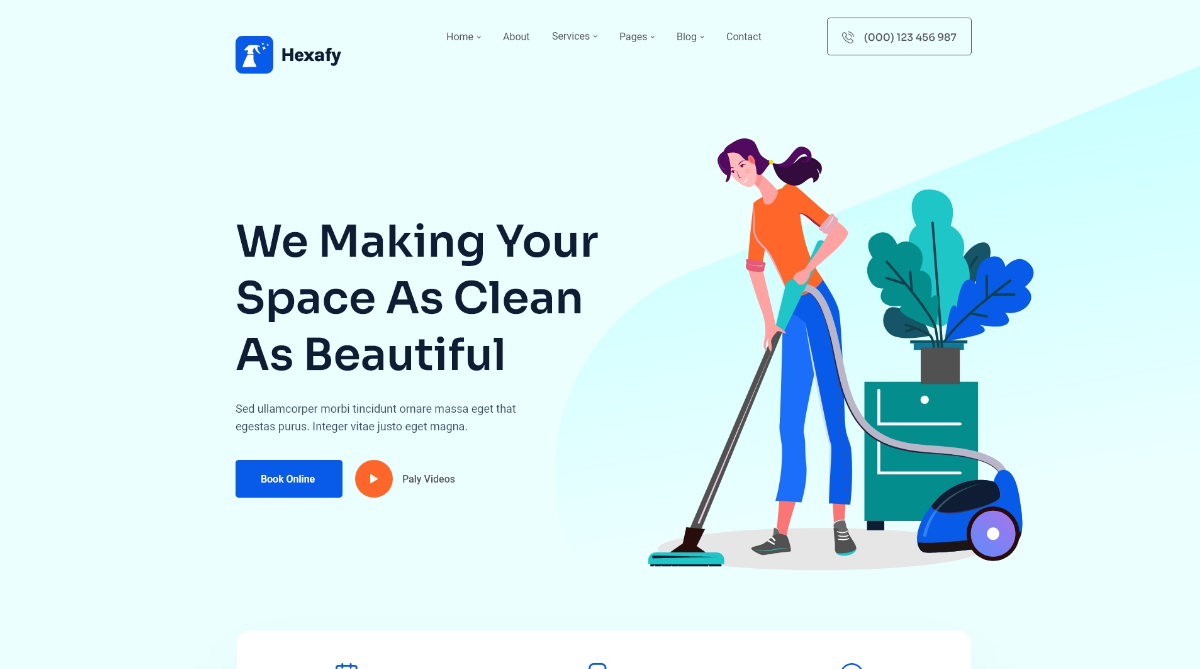
Today we introduce you to a brand new WordPress theme for your cleaning business. During covid, cleaning service has been increasing here and there for keeping the virus out of our sights. With that in mind, we have designed Hexafy – A modern cleaning WordPress theme with Drag and Drop builder Elementor.

It comes with a beautiful prebuilt demo and with different homepages for you to choose from. It can be used for a personal cleaning business or a corporate cleaning service business. If you run a business to clean hotels, motels you can also use it. What is more exciting about it is that you don’t need to know to code. All the pre-built templates can be imported with one single click.

Grab the theme here

Special features:

  • Elementor Page builder
  • Custom elementor widgets
  • 18 Layouts
  • 03 Home Pages
  • Lottie Animation
  • Smart Mobile Menu
  • Working Ajax Contact Form
  • Easy to Customize
  • W3C Valid Code
  • Modern & Clean Design
  • SEO Friendly
  • Bootstrap 4.X Based
  • Sticky Header
  • Fully Responsive
  • Cross Browser Compatible


Elementor is a modern drag and drop builder which is right now ( when writing this post ) the most popular plugin for WordPress sites.

Design WordPress emails without writing code

WordPress is an amazing platform for creating a personal blog to even business sites. Millions of sites run on WordPress throughout the internet now.

Throughout all the sites everyone has contact forms or subscription forms through which they get the user’s email and send them emails. Even on WordPress e-commerce sites, you need design emails. But that’s where the problems get bigger as designing emails is no easy task since it requires you to learn HTML and on top of it emails don’t support modern CSS methods.

But today we are showing you how to deisng your WordPress emails without any code using Elementor.

Introducing Elemailer, A drag and drop email builder for your WordPress sites. Elemailer uses Elementor Page builder’s UI to let you design your emails. As a fan of elementor, I personally love this.

With Elemailer & Elementor you can design Contact form 7 email response & Elementor Pro’s form widget’s email template within a matter of minutes for free.

Using it one can really forget about wring complex td, tr code for emails and just drag and drop from now on.

The pro version Elemailer offers more functions such as lists, subscriber, segmentation, statistics, and many more. In our next article we will show a step by step procedure of how email designing is done in Elemailer with Elementor

Hosting WordPress on Cloud with UpCloud

In this tutorial, we will learn how to create a Free WordPress site on Cloud

Good hosting is needed when you have a WordPress site with a good amount of visitors, especially if you are using woocommerce for having an online shop/booking site/ digital downloads site. UpCloud is a European cloud service provider which provides the world’s fastest cloud servers. It provides 100% uptime SLA from eleven data centers around the world: Amsterdam, Chicago, Frankfurt, Helsinki, New York City, London, Madrid, San Jose, Singapore, and Warsaw, and day by day they are adding more data centers. They are the world’s fastest cloud service provider because of Uniquely fast block storage, Always secure and available, Scalable, and cost-effective. We love them for their high performance, reliable service, and competitive prices. Basically, they are providing you cloud VPS to host anything you want. In this blog, we will focus on how you can set up your WordPress site on a brand new Upcloud account.

First thing first –

WordPress on Cloud hosting with UpCloud & Cyberpanel

As with any tool, it does take a few minutes to learn how to use UpCloud and also how to use WordPress.

Steps needed:

Step 1: Choosing a Domain Name

Your domain name is the main identity. Your domain name is what people type into their browser to get to your website. Though it’s tempting to choose something funny or flashy, pick a domain that both represents your brand and makes it easy for people to find you. You can get your domain from a place like Namecheap

Step 2: Setting up your free UpCloud Account.

1. When you use our provided link above or here, you are eligible for getting a 25$ free credit on your account.

2. After clicking our link, you will have to fill in your billing details and credit/debit card details. Don’t worry your card will not be charged by them. It’s just for safety and to avoid abuse of the promotion.

3. Once we are registered, head to the billing page on your account and you should see your 25$ free credit. Now you will have a limited time to use that credit, but if you add 10$ to the account the total 35$ will be lifetime usuable. Take your time 2-3 days, see if you like upcloud or not, and then if you want to continue deposit 10$.

Step 2: Installing Cyberpanel on your new Ubuntu VPS from UpCloud and installing WordPress on the Cyberpanel.

Final Step: Finish setting up your WordPress site.

Now that you are ready to start working, you should find yourself on the Dashboard ( wp-admin), or the back-end, for your new website. This is the service area that allows you to control what your website visitors will see when they land on your pages. Spend some time learning this dashboard by reviewing features that you will use most often.

  • Browse the themes, and choose one that you like. You can have a look at some of our paid themes as well.
  • Customize your theme with colors, headers, and social media buttons.
  • Upload photos to inspire your site visitors and add clues about your values and services.
  • Create your first blog post and home page content.

Additional Tips for new WordPress users.

  • Create engaging content to your site appear in search engines
  • Make sure you have the latest version of WordPress to get the full functionality of the CMS platform
  • Link to your social media profiles.
  • More guides here

Get 25$ free for lifetime on UpCloud when you Signup

Good luck! If you face any issue, you can post your comment about it and we will try our best to help you guide through.

Next Generation Personal Portfolio WordPress Theme – Anevo

Portfolio! Even it’s personal, so nice to hear. A portfolio shows a genuine illustration of something that you are at home. In the professional world, at present needs to show each one’s personal portfolios to prove to be more professional. Wanna attract your clients to more portfolios? Then you need such WordPress theme that separates prefectures from your WordPress blog.

Anevo- Personal Portfolio WordPress Theme

Anevo- Personal Portfolio WordPress Theme

Hope you can understand that how much WordPress theme can express your personal portfolios on site. Voidcoders has launched a theme that offers more creative and beautiful designs to generate special prefectures. The theme is Anevo.

Anevo WordPress theme allows editing with ample white space and lucid typography. So the viewers will capable to have a clear view. Anevo WordPress theme features more. Let’s know about the amazing features.

Why Need Anevo WordPress Theme?

Pricing: $27 with 6 months of customer support.

Notable Features:

  • 6 homepages and 6 versions of portfolios
  • One-click demo
  • Works with drag and drop page builder
  • Limitless header and footer like page builders
  • Variety in the widget for portfolio designs
  • Inner page templates
  • Gallery layout with list type
  • Portfolio single layout
  • Team member widget
  • Single blog page and search option
  • Fully responsive and grid system layout
  • Themify and social icons
  • 25+ various professional page templates
  • Integrated with Elementor
  • Call to action buttons
  • Search page
  • Clients carousel
  • Style variety for a portfolio showcase
  • Safari, Firefox, Opera, Chrome, Edge, and IE9 cross browsers are compatible with this theme
  • 400+ icons with awesome fonts
  • Option to generate videos
  • Powered with Bootstrap
  • Parallax sections
  • Smooth animation
  • Unlimited color
  • Free Google Fonts
  • Ready to get attached with Contact Form 7
  • Another Contact Form setup
  • Works with included Google maps
  • Free plugins and Google map have integrated
  • You can also make personal / WordPress Tutorial Sites as well
Pros Cons
Clear and simple ready designs A late response to customers support
Compatible with renowned software and WordPress 5x versions  
400+ icons  
25+ templates  
Grid system layout  
Contiguity with HTML and CSS upgraded version  

User Rating: 4.8/5

Wrap Up

Isn’t it a modern and fast theme? Then look no further than Anevo WordPress theme. As far as about designing, the modern design creates a lucrative look at your contents. Hence, the viewers like it more when it’s much understanding. Also, integrated with Elementor upgraded version V2.7.

Now it’s your turn because the usage depends on your choice. Also, the customer’s preference level rely on what you choose for your site.

What’s New on WordPress 5.7 in 2021?

WordPress core is creating the jump from jQuery 1.12.4 to jQuery 3.5.1! this can be an enormous deal for uncountable reasons — like fashionable options, better DX, and security enhancements to call some. Right now, the arrangement is to unharness the update in WordPress 5.7, which is slated to unharness on March 9, 2021.

First off, as with all of the major releases, there are some updates to the block editor, Gutenberg. This update will bring it to be alongside Gutenberg 9.9. So if we use the plugin, we have probably already seen some of the changes. Another update is that we now have the option to make a block be 100 percent of the height of the viewport or window. A classic example of this would be using the image or cover blocks to create a hero image at the top of the page.Thats something that’s taken some time to finagle to create in the past,but should be super simple now.

WordPress 5.5 brought us lazy loading for images and now WordPress 5.7 will do the same for iFrames. Now a loading attribute will be added to any iFrame,allowing it to be loaded as the user scrolls down the page as opposed to just on the page load.

And this will basically apply to any video from an external link as well like youtube or vimeo.And it will be a big help in speeding up any page that features an iFrame.

Table of contents

  1. Full Site Editing
  2. Features and improvements
  3. Gutenberg

Full Site Editing

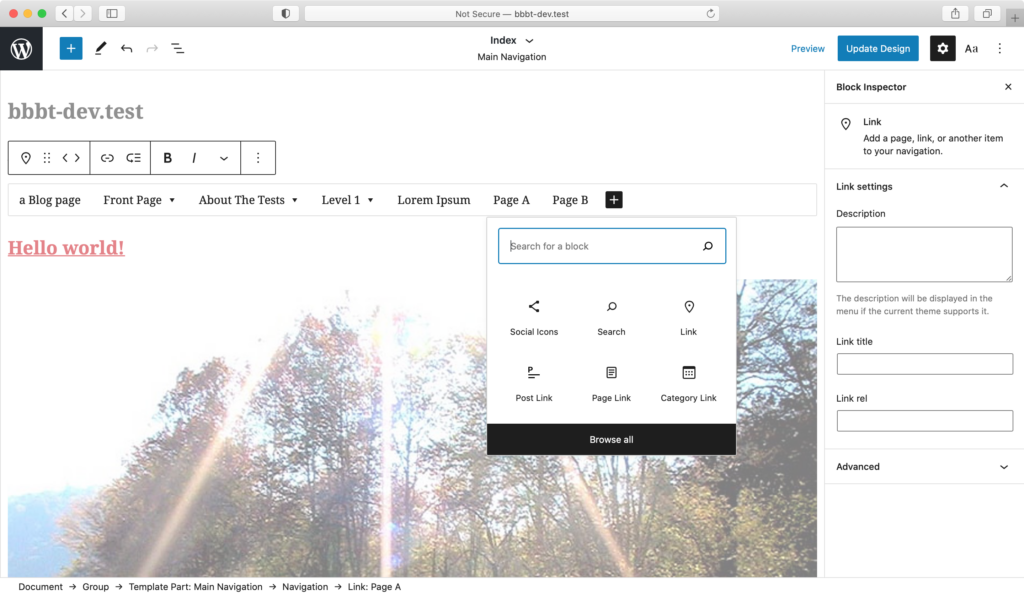
A new feature in WordPress is complete site editing. It enables us to make all parts of our website using Gutenberg blocks. We visually can use Gutenberg editor to design your website header, footer, pages of archived documents and more. It works in an experimental feature at the moment. But we can use the plugin Gutenberg and a WordPress theme compatible with FSE. The core WordPress team also works on the feature ‘Global styles’ with the entire site editing feature that enables us to adjust our typography, color scheme and more globally on our website.

Now we can visually create Gutenberg blocks, not just a page or posting, to create our whole website.

  • Header
  • Footer
  • Archive Layouts
  • Single Layouts
  • 404 page
  • more.

Global styles feature in Gutenberg is the theme customizer killer.

full site editing site

All the world styling is presently done exploitation theme customizer, however, with FSE, we’ll additionally get a world Styling panel that behaves equally to the theme customizer that helps the US to tack our all things of the complete website. There’s additionally associate choice to customize the default styling for every block so after we add that individual block on a page or post, that styling is auto-applied (we will customize it, though).

Full website redaction can use block-based themes. Block examples and block template elements square measure the core elements of a block-based theme. Gutenberg developers are building a library of site-building blocks. Most of the fundamentals square measure already in place: website Title, website Tagline, Post Title, Post Content, varied information and Comments blocks, and more.

There square measure three specific areas in active development to support Full website redaction – example Manipulation, Block Patterns, and world designs.

Planned Features and Improvements

The main goal for WordPress in 2021 is Full Site Editing via Gutenberg. WordPress 5.7 will be the first step in that direction. 

We may see more features added before the official release, but here is what has been added in WordPress 5.7 in 2021.

Core

  • Lazy-load iframes – Enabled by adding the loading=” lazy” attribute to iframe tags on the front-end.
  • Migrating from HTTP to HTTPS – This method currently happens in one click! URLs within the info square measure mechanically replaced once the location and WordPress Address square measure each victimization HTTPS. Also, the website Health currently includes an Associate in Nursing HTTPS standing check.
  • Standardize colors employed in WP-Admin CSS to one palette – The palette makes it straightforward to create parts our users will browse, as a result of[*fr1] the vary offers you the excellent distinction with white kind.
  • Ongoing cleanup once updates to jQuery 3.5.1 – jQuery deprecations in WordPress Core and bundled themes show uploads less usually.
  • New Robots API – Permits the filter directives to be enclosed within the ‘robots’ meta tag. Also, the directive max-image-preview: large is currently enclosed by default to permit massive image previews to be displayed in search engines

Editor

  • Inserter drag and drop: Blocks and block patterns will currently be dragged directly from the inserter into the post canvas.
  • Full height alignment: Blocks like the quilt block currently will have associate degree choice to expand to fill the complete viewport.
  • Block variations: The icon and outline of a block variation are currently shown within the block inspector. And a brand new dropdown within the block inspector permits you to switch between block variations.
  • Reusable blocks: many enhancements to the usability and stability of reusable blocks are created, and reusable blocks are currently saved at an equivalent time that the post is saved.
  • Buttons block: The Buttons block currently supports vertical alignments, and you’ll be able to set the dimension of a button to a predetermined share.
  • Social Icons block: you’ll be able to currently amendment the scale of the icons within the Social Icons block.
  • Font size in additional places: you’ll be able to currently amendment the font size within the List and Code blocks.
  • Many several different enhancements and bug fixes: to ascertain all of the options for every unharness very well look at the Johannes Gutenberg unharness.

As with all WP releases, all part maintainers and groups are invited to prioritize their bug fixes and enhancements for 5.7. Likewise, they’re conjointly asked to continue sprucing all of their current interactions and creating the UIs additional easy.

Whats new in Gutenburg 10.0?

This is printer 10.0, which implies it’s a centesimal unharness of the printer plugin, the centesimal unharness of a journey that started quite four years agone once Matt proclaimed the project on the WordCamp United States 2016. (It’s additionally virtually to the mark the fourth day of remembrance of the initial conceive to the printer repository.)

The hundredth iteration of the block editor, Gutenberg 10.0 was free on Gregorian calendar month seventeenth, 2021, with some new options, enhancements, new APIs, and bug fixes.

Features:

Blocks

You’ve definitely heard of the ‘blocks’ of Gutenberg if you know them. The blocks are a vital new addition to the WordPress environment, and the term is suitable for creating content since they are literally building blocks.

Adding a list block.

What You See Is What You Get (WYSIWYG) Editing

We’ve already discussed the general look of the new editor, but it’s worth repeating just what a massive change it represents for the way we create content in WordPress. Gutenberg introduces a full What You See Is What You Get (WYSIWYG) interface, which ensures that you always know exactly what the layout will look like once it’s published.

Dynamic Options

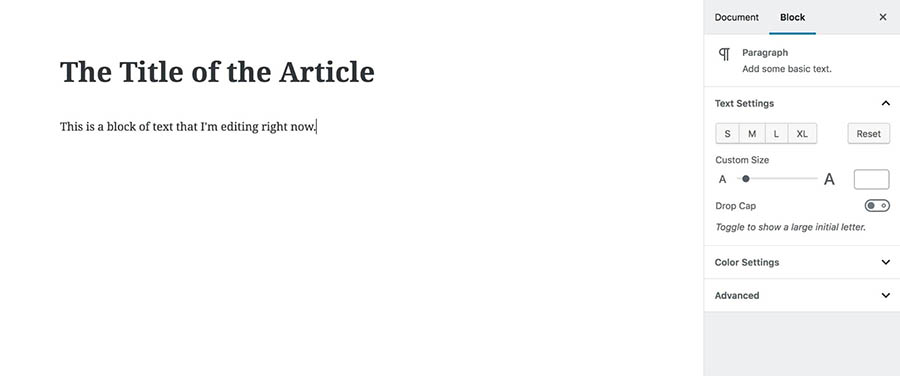
Another change that the WYSIWYG interface brings is a new method of handling content options. Instead of a static toolbar coupled with numerous settings strewn around the main editor, Gutenberg will only show you options related to the specific block you’re currently editing.

For example, if you’re editing a text paragraph, you’ll only see the formatting choices and other settings that are relevant for that block.

Options for a text paragraph block.

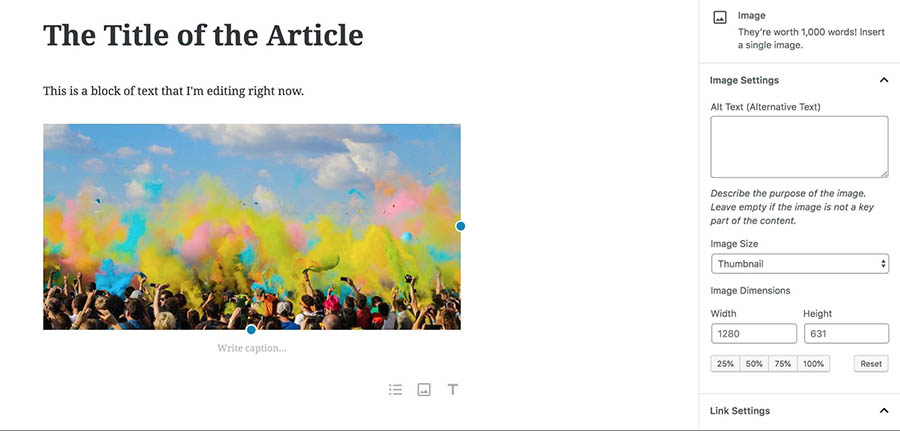
If you start editing an image, the choices in the sidebar will change.

Options for an image block.

Document Outline

The characteristics that we discussed till now were some of the main modifications Gutenberg had to make. Now focus on the tiny additions offered by the editor.

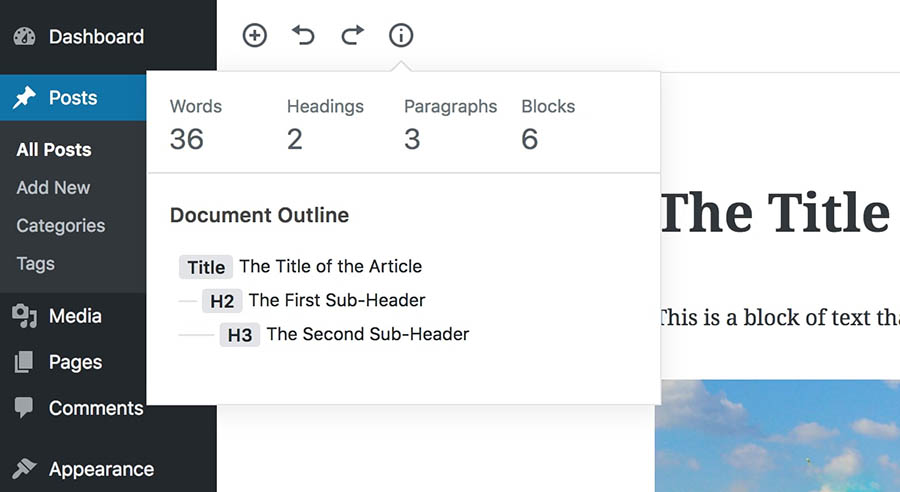
The new document outline, which is a tiny but useful enhancement, is first out of the gate. You may view this feature by clicking on an information Button at the upper left corner of the editor, when you add at least one heading to your content.

The Document Outline popup.

As you can see, not only will this display your document’s word count and how many blocks it contains, but you can also view all of the headings you’ve added.

Anchor Support

Another Gutenberg feature many users wanted to add HTML anchors to your stuff. You may now add anchor blocks to connect to a certain block directly from anywhere on a page or post.

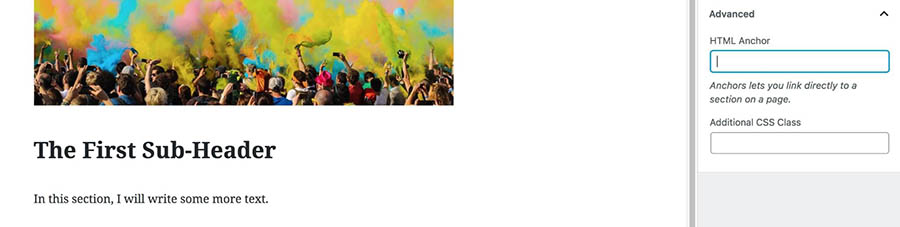
Imagine connecting back to a specific heading in one of your posts afterward. You may add an anchor to your header block using the HTML Anchor field.

Adding an anchor to a heading block.

For example, you may provide “header one” as a block anchor for a poster using the “Text-Post” permalink. The URL https.//yoursiti.com/text-post#anchor-text may then be used to connect to that anchor anywhere inside the post. This is very helpful for long-form information and is also beneficial if you want to design your own content table.

Tables

Tables are a basic element of most programs for creating content, but they have been relatively difficult to utilize traditionally with WordPress. What a plugin or HTML code was previously necessary is now easily available as a Gutenberg block.

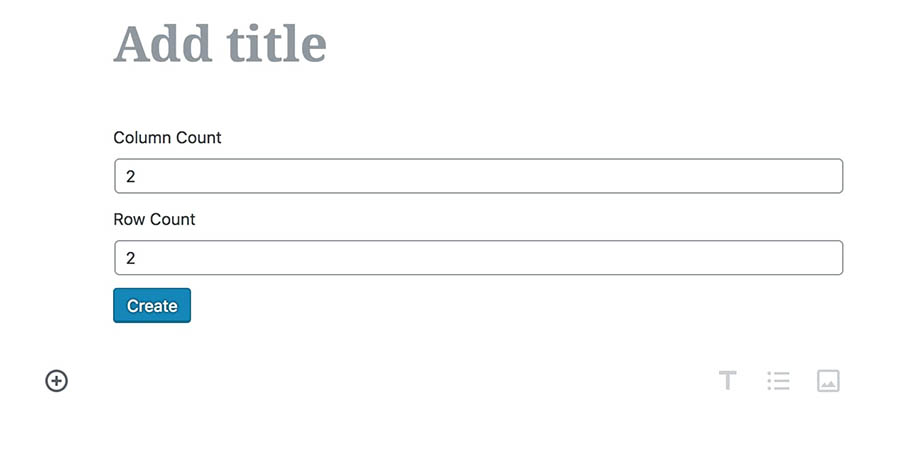
All you have to do is add your page or post to a table block. The number of rows and columns that you wish to include is then requested.

add titles on table

Once you’ve done that, the table will appear, ready for you to fill with content.

It should be said that this block is still somewhat lacking in features. For example, you can’t style it, or change the number of rows or columns afterward without manually editing the block’s HTML. We’re hoping that these features will be added with time, but even in its current state, this is a tremendous improvement over the classic editor (which lacked a table option altogether).

Buttons

The modest button is another rather fundamental function WordPress lacks until far. Gutenberg has fortunately created a button block that allows you to easily implement such feature. You may alter your wording and link when you create a button block.

Adding a button in Gutenberg.

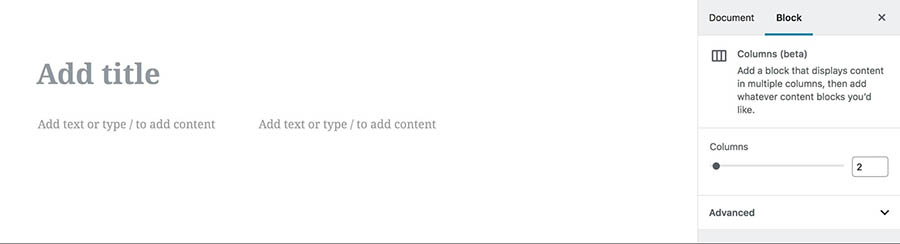
Text Columns

While this feature is currently still in beta, it’s one we’re particularly excited for. This is a variation of the standard text block, which lets you split your content across responsive columns.

You can currently choose between one and four columns.

title columns

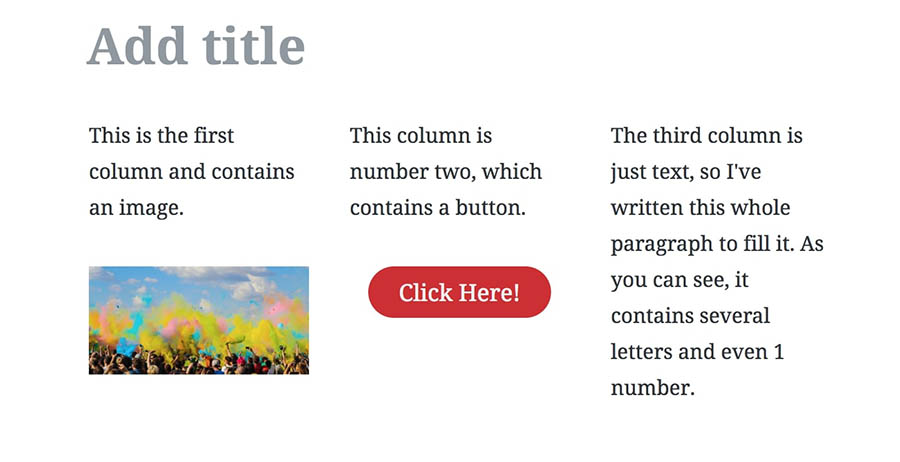
Each column can contain its own blocks as well. This lets you create complex layouts, like this one that includes three columns with differing content.

text columns

Since the text columns are still a job, they might presently be a bit hard to utilize. Instead of the individual blocks in it, it might be difficult to discover the options on the column block. However, as soon as the WordPress contributing team of developers considers the publisher ready for prime time, this function is a welcome addition for many users.

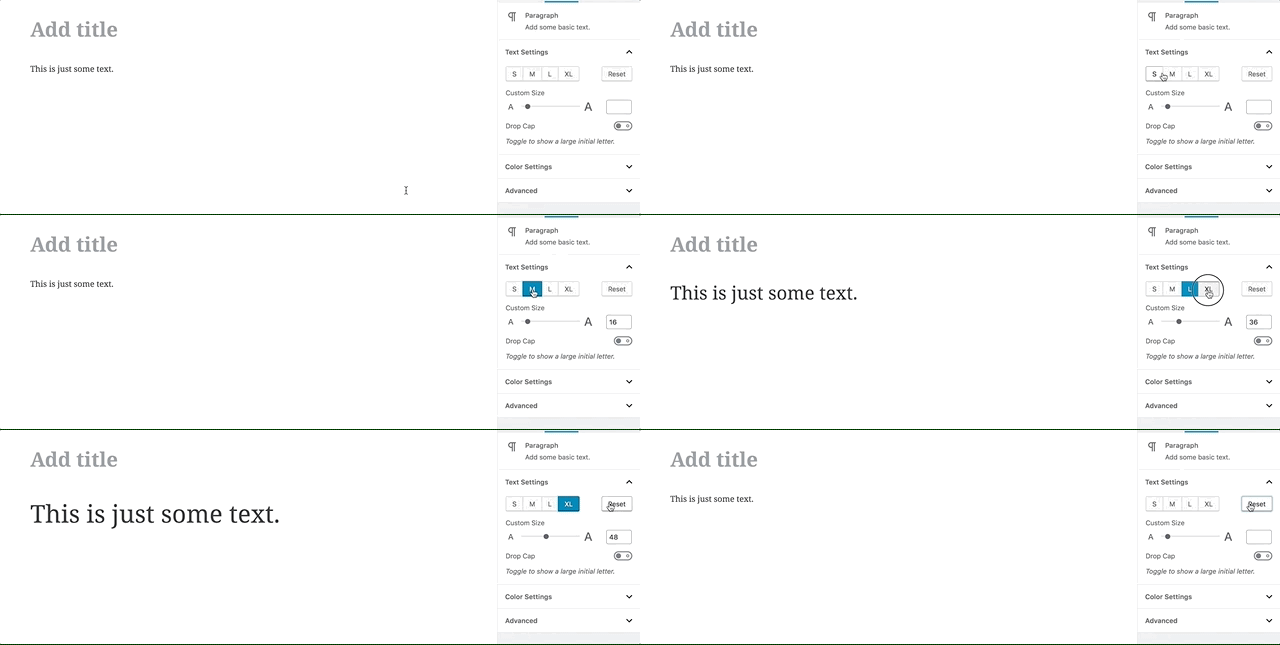
Easily-Adjustable Font Sizes

Gutenberg is all about user-friendly and intuitivity in every choice. This might even be as simple as your text’s size. You now have several possibilities for the size or smallness of your typefaces.

You may select one of four preset sizes here, for example.

font sizes

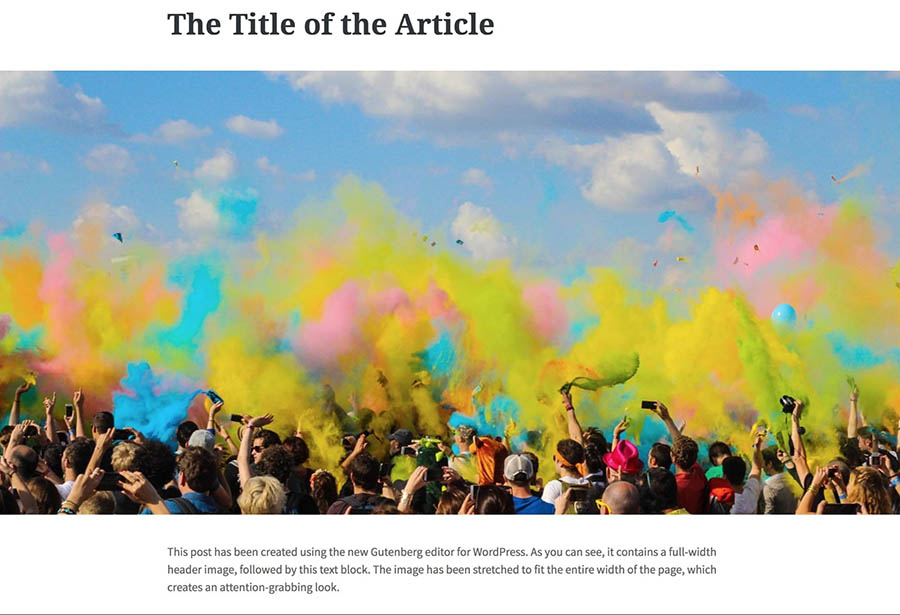
Full-Width Alignment

Finally, we come to an option that was highlighted in the official demonstrations of Gutenberg. This enables broad and comprehensive content creation. In other words, the whole width of the page may now extend to your content.

Enhancements:

This unleash has created some necessary enhancements sort of a darker social link state for dark themes. The recreate has conjointly created several enhancements and bug fixes current for the navigation, block-based gadget screens.

Version 5.7 is Looking Good

The WordPress team is functioning round the clock to form things higher and supply the USA. From each new unharness, you’ll be able to expect exciting new enhancements and improvements to the core and editor.

WordPress 5.7 Roadmap:

  • February 2021: WordPress 5.7 Beta 1 release
  • March 9, 2021: WordPress 5.7 Release Date

Wrap Up

Above are the latest features of WordPress 5.7. Our team has been updating our WordPress themes to support this version. Please stay tuned!