How to install plugins and themes in WordPress

Hello guys!

Installing plugins and themes are the most used thing in WordPress. Almost every day, you may need to install new plugin or theme for either test or for use. Today I am going to show you this very basic needs and this is going to help you a lot if you are new to WordPress!

WordPress Plugins

WordPress plugins allow admin to add features such as slideshow, enlarge a gallery etc. There are thousands of premium or paid and free plugins to make WordPress amazing.
Plugin Installation Steps

Many new users have asked for how to import plugins for WordPress and the methods related this. This article is about the WordPress plugin installation step by step. You will get guidance for WordPress theme installation at the end of this article.

1st method: WordPress Plugin search

This method is only for installing free plugins. Using WordPress plugin search has become the easiest way. The very first WordPress beginners get benefits with this method step by step.
  • At first move to WordPress admin area. Click on Plugins> Add New.
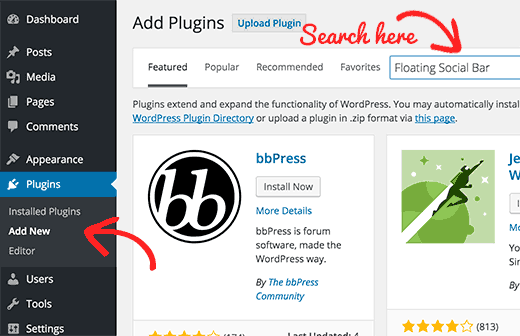
  • Type the functionality preference or the plugin name
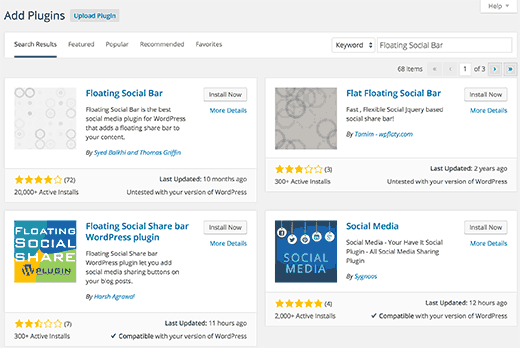
  • From the bunch of plugins, choose one and click on “Install Now” button.
  • The preferred plugin has installed. Click on “Activate Plugin”
Your wished plugin has installed and activated. Design your website from now with free plugins.

2nd method: Using FTP

This method is for installing premium plugins. Additionally, you face problem to install plugins from admin area. Using FTP will help you with the given stage by stage below.
  • Start by download plugins source file (zip file) and extract it
  • Next using an FTP client, upload on your website the named file through the extracted zip file
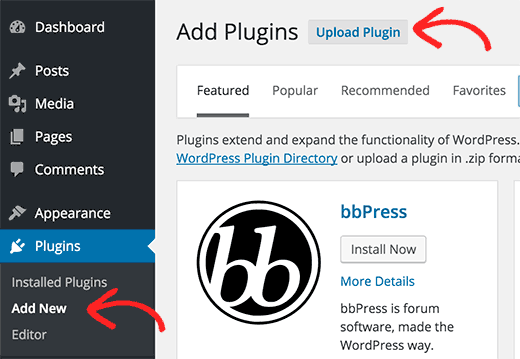
  • Contact WordPress Hosting Provider and ask to provide FTP username and password. Need to access through the FTP manager
  • Expose the FTP client and attach to the website via FTP username and password
  • Access to /wp-content/plugins/ and upload the created folder on it
  • Go to WordPress menu and click on “activate plugin” button
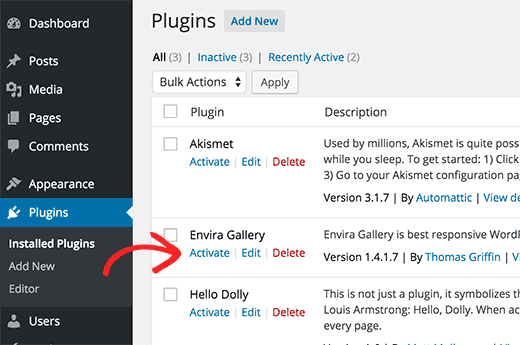
Once after installation and have a look at your chosen plugin as it has been new on the dashboard. Get the plugin settings and sketch your website.

WordPress Theme

Did you have installed your right one plugin? Hope you have done with our instructions on the previous part.
Since you are a beginner, very much trouble for you searching your ideal themes. WordPress themes will help you to fulfill your dream of web design. In this part of the article, we will guide you how to install or import WordPress themes.

Precautions

  • Before activate or add a theme on the dashboard, have a look at its functions
  • Changing WordPress theme is not difficult but it is a must to view a checklist of things

Themes Installation Steps

We prefer methods as one is for free themes installation and the other is for paid. So the steps of methods are here for beginner friendly.

1st method: WordPress Admin Theme Search

Are you searching ways for free WordPress themes installation? Or you want to import free themes on your WordPress dashboard?
This method is only for you if you are a true beginner on WordPress.
  • Start by login to WordPress admin area and click on Appearance> Themes
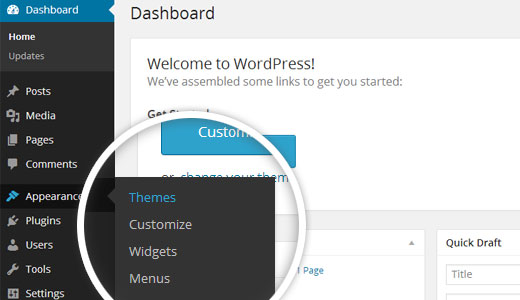
Click on Appearance Themes
  • On the themes page, get on Add New button
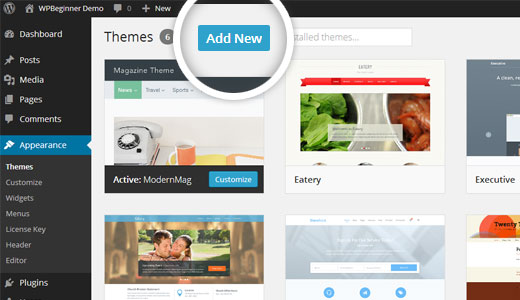
Add New Themes in WordPress
  • Select theme from Popular themes, Featured themes, Latest themes based on your criteria
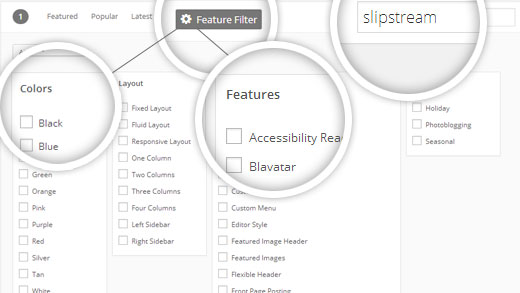
Search for WordPress Theme
  • Move on the themes’ image and press on install option
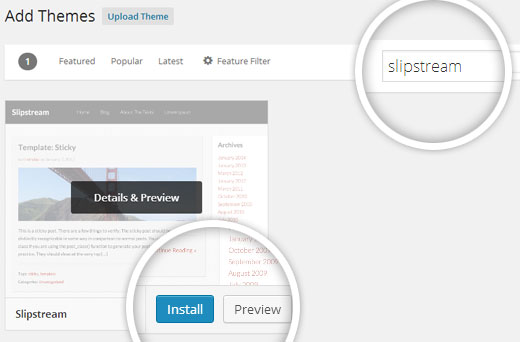
Install a WordPress Theme
  • A success message will show with “Activate” option
After installation, configure the theme settings

2nd method: WordPress Admin Upload Method

Premium themes serve better than free themes, is not it?
WordPress admin upload method is the one for installing commercial premium WordPress themes. Also install custom themes from iThemes, StudioPress and Themelab. Self-hosted WordPress.org users have permission to install.
  • At first, go to an online marketplace and buy a commercial theme. Now download the source file (zip file)
  • Login to WordPress website and click on Appearance> Themes> Add new.

Add New Themes in WordPress

  • Click on Upload Themes> Choose file> Upload zip file
WordPress Theme Install Upload Theme
  • Click on “Install Now” button and press the “Activate” option.
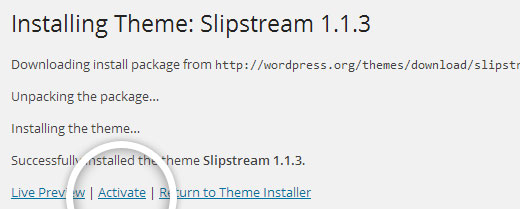
Activate a WordPress Theme
So, we hope this beginner’s guide will support you a lot to install both WordPress theme and plugin.
For further inquiry, leave a message in the comment section.

MicroSoft is acquiring GitHub!

Microsoft is buying GitHub! So GitHub will be now GitLab!

After reports emerged that the software giant was in talks to acquire GitHub, Microsoft has made it official today. This is Microsoft CEO Satya Nadella’s second big acquisition, following the $26.2 billion acquisition of LinkedIn two years ago. GitHub was last valued at $2 billion back in 2015, and Microsoft is paying $7.5 billion in stock for the company in a deal that should close later this year!GitHub is now with Microsoft

GitHub is a large code repository that has become very popular with developers and companies hosting entire projects, documentation, and code. Apple, Amazon, Google, and many other big tech companies use GitHub. There are 85 million repositories hosted on GitHub, and 28 million developers contribute to them. GitHub will now be led by CEO Nat Friedman, the founder of Xamarin, who will report to Microsoft’s Cloud and AI chief Scott Guthrie. GitHub CEO and co-founder Chris Wanstrath will now become a technical fellow at Microsoft, also reporting into Guthrie.

It’s easy to imagine why Microsoft would want to acquire GitHub. Microsoft killed its own GitHub competitor, Codeplex, in December and is now the top contributor to GitHub, Microsoft now has more than 1,000 employees actively pushing code to GitHub repositories. Its popularity among developers could see Microsoft earn some much-needed trust and respect from developers. In bigger enterprises and slower moving businesses, the fact Microsoft has acquired GitHub will make it more trusted to use for projects and source control, simply because Microsoft is already trusted across many software and services by these companies. “We will accelerate enterprise developers’ use of GitHub, with our direct sales and partner channels and access to Microsoft’s global cloud infrastructure and services,” says Microsoft CEO Satya Nadella.

Microsoft won’t be able to address the general concern that important tools and internet services keep being consolidated into the hands of a few big tech companies. “When it comes to our commitment to open source, judge us by the actions we have taken in the recent past, our actions today, and in the future,” says Nadella, in an attempt to ease concerns around Microsoft’s acquisition.

For all the concerns, there are plenty of reasons to see this as a positive for Microsoft and GitHub users. Microsoft has been actively pushing open source technology, and the company has open sourced PowerShell, Visual Studio Code, and the Microsoft Edge JavaScript engine. Microsoft also partnered with Canonical to bring Ubuntu to Windows 10, and acquired Xamarin to assist with mobile app development. These are moves that have been met with surprise by developers initially, but that have earned respect. It’s essential that Microsoft stewards the GitHub community forward to earn even more trust and developer love. The Microsoft old isn’t the Microsoft of new, and this GitHub acquisition is a chance for Microsoft to prove that even further.

Microsoft has struggled with developer love for years, and it’s a big part of the reasons Windows Phone failed and that its Universal Windows Apps platform hasn’t taken off. Microsoft has spent recent years improving Windows 10 so it’s a respectable development box, and tools like Visual Studio Code — which lets developers build and debug web and cloud applications — have soared in popularity with developers. Post Credit- TechCrunch

So? What do you think? Will people use GitHub like before or will use more than before!
Learn more from- GitHub blogs

5 best WordPress project management tools

WordPress project management plugins, which will assist you to stay systematic and on task always. To follow procedures and policies to remain within budget WordPress project management is a must since it involves organization, planning, and discipline. Therefore it enhances your teamwork with multiple members and to achieve pre-determined objectives. Intended for standard WordPress project management, WordPress has come with inclusive solutions precise in the interior of your WordPress dashboard.

This article is about 5 exclusive WordPress project management plugins of 2018.

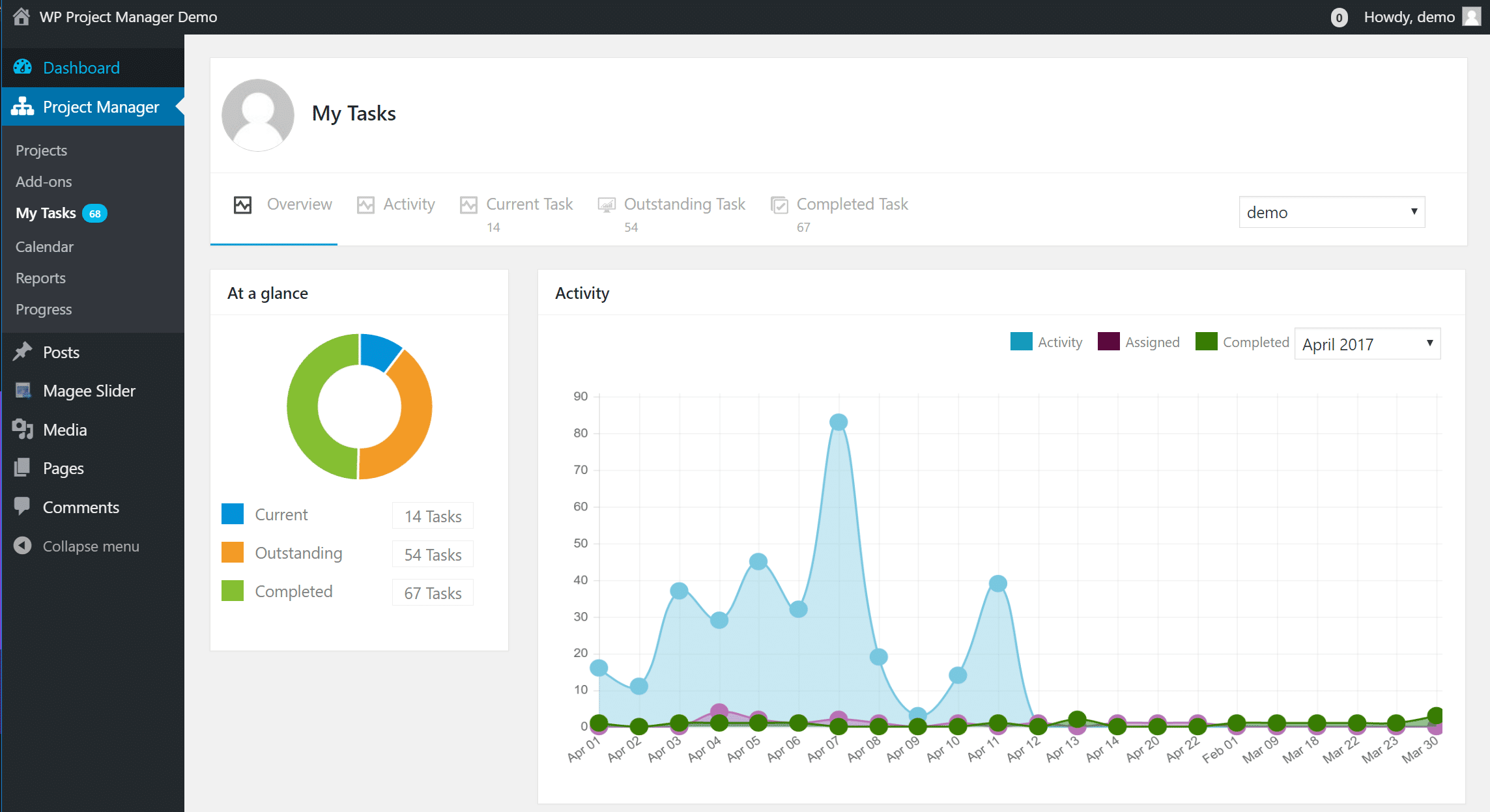
WP Project Manager

weDevs has this free project managing solution. WP Project Manager within your WordPress system will consent you to move your management functions in-house. Severally this opposed to letting your site to log in to the external site multiple times a day.

Here are the features of the free version.

  • Archive completed projects automatically
  • Observe current projects statuses
  • All files saved under a single notion in one place
  • Easily can handle each plan from inside WordPress
  • Admin at ease to control clients, assigning co-workers, managers and terms and policies
  • Create a calendar function for an overview of all plans thoroughly year
  • Track milestones

WP Project Manager

WP Project Manager Premium version pricing: $59/ year

Facilities:

  • Single license
  • Additional and exclusive configurations
  • Add-ons like subtasks, invoices, time tracking and Gantt charts are available

Rating: 5/5

Download link: WP Project Manager

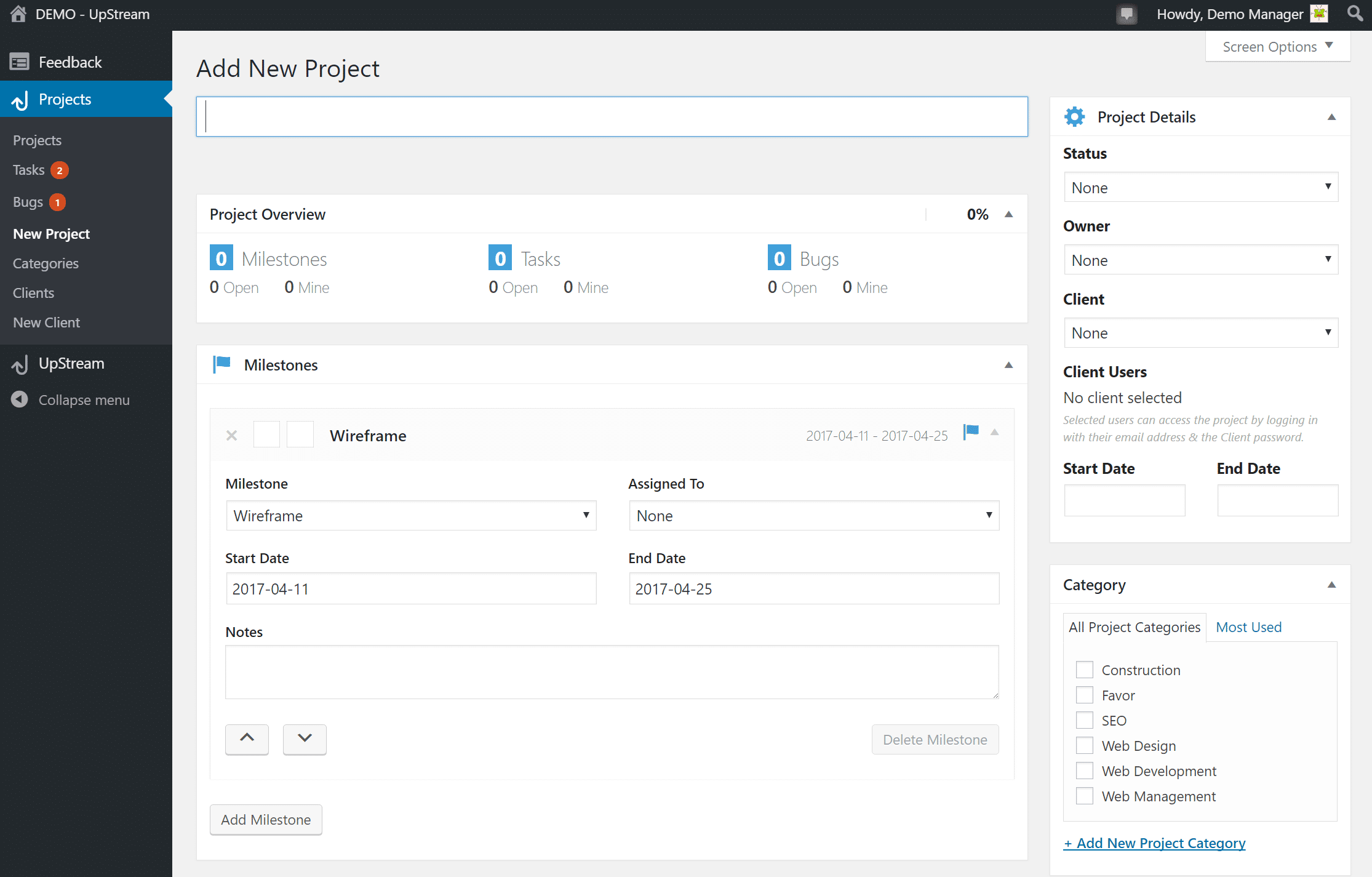
Project Manager by Upstream

From your WordPress website, you can certainly operate certain plans. Along with your clients can follow project of your plans via front-end aspect. This project manager is free of cost by Upstream and designed for professionals, agencies, and others.

It has some other comprehensive features, as well as project tracking, are here below.

  • Developer friendly
  • Bug tracking
  • Instant upload saved files and documents
  • Instinctive control of admin on managers and tasks
  • Automatic progress file admit
  • Custom fields for clients and admin details
  • Customizable templates
  • Discussion threads
  • Built-in roles for managers and users

upstream-task

Front-end and project timelines editing capabilities for the premium version of this plugin.

Pricing for Project Manager by Upstream premium version:

  • Personal website: $49/year
  • Professional website: $69/year
  • Agency website: $89/year

Rating: 4.7/5

Download link: WordPress Project Management by UpStream

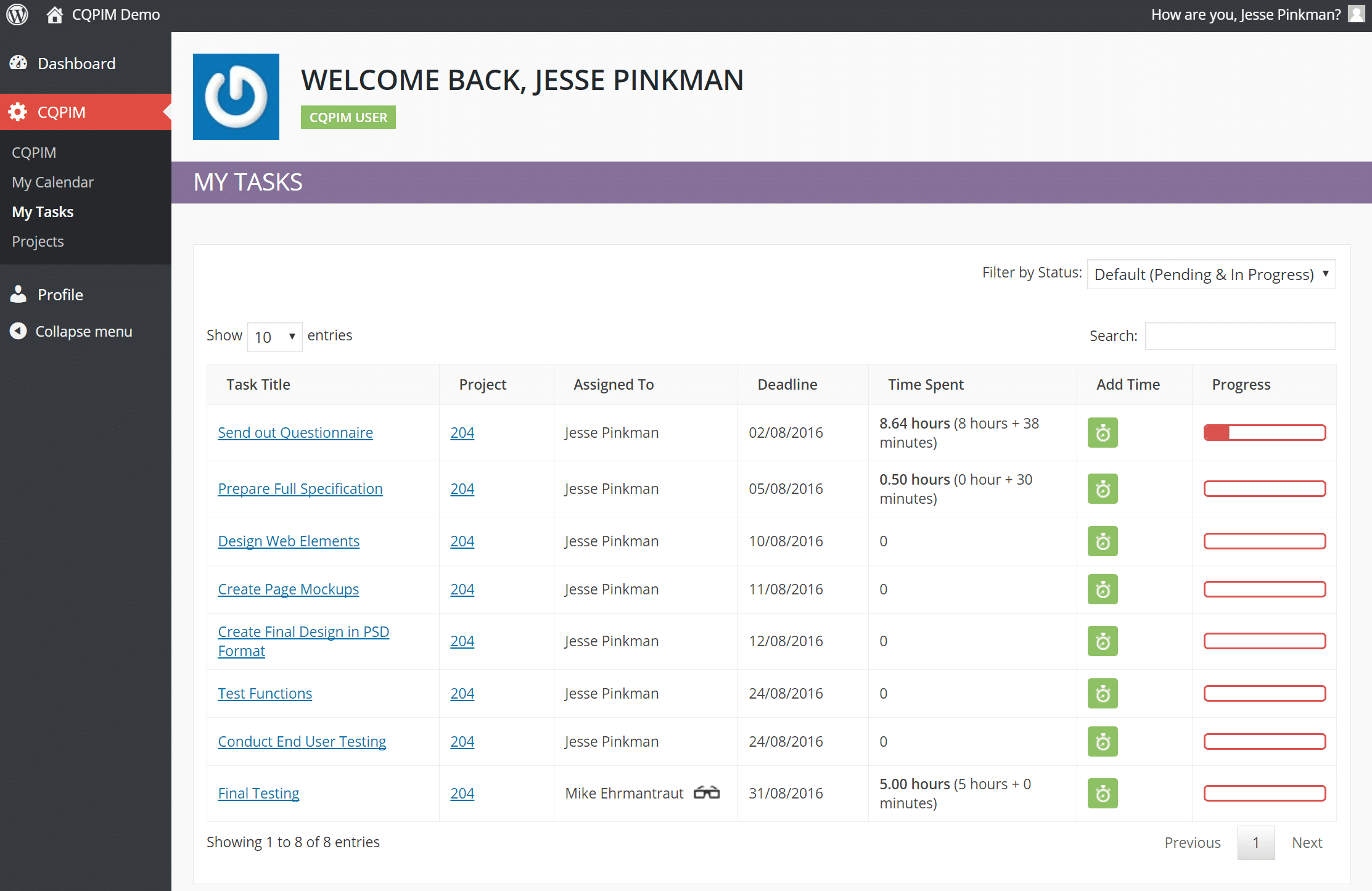
CQPIM WordPress Project Management

CodeCanyon has CQPIM WordPress Project Management with powerful settings. It has other separate features.

  • Existing user to CQPIM team members and clients conversion tool
  • Dashboard responsive for front-end, photos, clients and admins details, Projectopia themes and along with these for duties, projects, invoices, quotes and support tickets.
  • Project information includes milestones, files, financials, updates, and timeline.
  • Bulk changes for bulk tasks
  • Payment through Stripe and PayPal
  • Integration with Ninja Forms and Gravity Forms plugins

cqpm

Pricing: $43

Rating: 4.5/5

Download Link: CQPIM WordPress Project Management

Kanban Boards for WordPress

Are you searching for agile WordPress project management? If you have been looking for that then you will be right at home with this one.

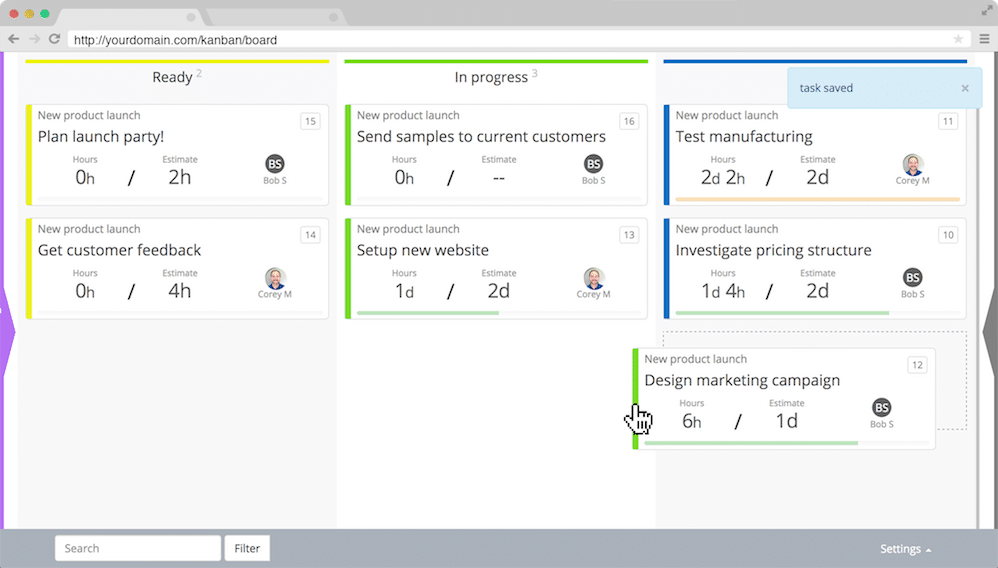
Kanban Boards works for agile WordPress project management as well as for CRM, scheduling content publishing and tracking sales. It has great integrations with Ninja Forms and Gravity Forms. Once you have it installed you will be recognized with these features.

  • Bookmarks to achieve custom views
  • Tasks always assigned to group members by each project
  • Supportive on mobile
  • Multilingual support
  • Multiple boards with task flagging, to-do lists and notifications
  • See updates live and collaboration of all files in exact time

kanban-task

Pricing: $49

Rating: 4.7/5

Download Link: Kanban Boards for WordPress

SP Project and Document Manager

SP (Smart Pants) Project and Document Manager is a plugin for WordPress that how quickly you can manage documents and the business integrations with vendors, clients and sales organization on online process. If you have been looking for a WordPress project manager with good documents handling capability check this out.

It has certain available features for the free version. Let us have a look at them.

  • Unlimited files for uploading and managing
  • Zip files for archive files and images
  • Advanced email editor
  • Organization control over user access
  • Require login to download documents
  • Multilingual support
  • Incorporation of Gravity Forms to the WordPress admin toolbar

The premium version is easy to access with extensive features.

  • AES file encryption
  • Admin, group members, and clients file in one place
  • Thumbnail mode
  • Google short links for files
  • Bootstrap powered dashboard
  • Pre-built custom forms
  • Clients personal access to upload, delete, search for and rename multiple files

Pricing:

  • $75/year
  • $575 for lifetime support

Rating: 4.8/5

Download Link: SP Project & Document Manager

For further inquiries or sharing your experiences with these plugins, please check in the comment section below.

Elementor Tabs Closed By Default

Elementor Tabs Closed By Default

A few days ago I wrote Elementor Accordion Closed By Default

I see people asking for a way to make the Tabs widget closed by default as well.

You can insert the HTML like the video here https://www.useloom.com/share/3896dc036a944ff68556b5ef354c0913

The code you need to insert:

<script> 
jQuery(document).ready(function($) { 
var delay = 10; setTimeout(function() { 
$('.elementor-tab-title').removeClass('elementor-active');
 $('.elementor-tab-content').css('display', 'none'); }, delay); 
}); 
</script>

I hope this helps you guys!

Again my method is without any plugins. If you are not comfortable with inserting code I suggest you look for some 3rd party plugin which can do this for you. Follow our blog for more tips and tricks on Elementor.

5 Best WordPress Live Chat Plugins

What is WordPress live chat plugin?

On our previous article, we have described WordPress and its multipurpose themes, plugins and so on. Now we are going to inform about WordPress live chat plugins which will force you to install them with a view to attracting your customers.

Live chat plugin WordPress

Do not Customers always like to have a response from their shopping sites? Yes, they do. WordPress live chat plugins are used for connecting with more customers and connect to other social apps. So let us have some WordPress live chat plugins at a glance.

LiveChat

best-live-chat-plugin

In live chat maintenance software, LiveChat is the Endeavour Leader not only implies this from its name but also by configurations. It is supportive of mobile devices, laptops, and tablets. You can add review form next to a live chat and can weigh your support team. Along with this, it is the best one ever in WordPress live chat plugins because it has some best features. Let us have a look at them.

Features Pricing Rating
Customers can refer support ticket during seller off- hours
  • Billed $16 per month annually or
  • $19 per month to month
  • 30 days free trial
5/5
Implements with other services like-

  • Zendesk
  • Popular CRM software
  • Current email marketing services
  • Google analytics
Saves the time for clients and vendors
Much speedy than other live chat plugins
Attractive and functional dashboard
Share button for share reviews on other social apps
Chat customizing option on windows
Single dashboard control to all conversations

Website: www.livechat.com

Zopim

The second best performer in live chat plugins for WordPress industry is Zopim. It is available and a dedicated WordPress plugin.

Do you want most stylish chat boxes with beautiful and customizable layouts and themes? Zopim is the right one. Moreover, it has some other configurations and they are here.

Configurations Pricing User rating
Special feature: customizable chat boxes
  • Premium access- $11.20 per month
  • Free trial- 30 days with limited features for one active chat
5/5
Unlimited free conversations
Access Zopim dashboard and respond to messages
Supportive on Android and iPhone app
Free subscription offer
Premium access lets you launch auto chat box
One agent can conduct and restrict other chats at one time

Website: www.zopim.com

Casengo

Casengo is the most popular WordPress live chat plugin for adding live chats on websites. It has some coolest features and they are given below with pricing and rating.

Features Pricing Rating
Multi-channel support
  • Premium plan- $10 per month
  • Free trial- for 5 agents
4.5/ 5
Manage multiple websites
Incorporation with-

  • Twitter
  • Facebook
  • Whatsapp  
Phone and tablet compassionate
Casengo FAQ plugin for clients
Team alliance
Cope up with multiple mailboxes

Website: www.casengo.com

Olark

Do you want the simplest live chat plugin for WordPress? Casengo is the precise one.

For an online business, it is easy to add Olark and you require to replica a code snippet into your hosted WordPress child theme or widgets. Otherwise, it offers a free Olark if you do not have coding knowledge.

It is the simplest one because it has some simple features.

Features Pricing Rating
Connect to patrons from anywhere through any android devices
  • Premium plans- $17 per month
  • Free trial- 30 days for 20 conversations
5/5
Integrate with other services-

  • Highrise
  • Salesforce
  • Zendesk
  • Groove
Show and hide chat box
You can track customer satisfaction, chat frequency
Can uproot Olarks’ branding
Have assembly of operators- transactions team and support team

Website: www.olark.com

WP Live Chat Support

The only free best live chat plugins for WordPress is WP Live Chat Support in today’s’ carrier list.

It has certain configurations which will allow you to install this as soon as possible as it is free and people want the free ones all the time. But the fact is, this ones’ pro version must cost you $39.95 as it has some upgraded features.

The configurations of WP Live Chat Support are below with rating.

Configurations Pricing Rating
Convenient chat box Free of cost 4.95/5
Six pre-defined chat box covers
Visitors are able to drag chat box on the screen
Inclusive control panel
Unlimited chat history and free conversations

Website: www.wplivechatsupport.com

Nothing beats live chat as browsing the internet senses quite measured, is not it?

I am quite sure it is therefore live chat empowers vendors to provide exceptions by resolving purchasers problems easily. Driving out solutions through live chat has become a fashion and it works rapidly by removing buyers’ friction, sales queries in exact time.

With all these alignments, live chat plugins make WordPress more stylish CMS than ever before. So choose your right one from these plugins and add-on website you belong to.


5 Best Plugins to Create Multivendor Marketplace

Are you searching for the best plugins to create multivendor marketplace?

As we have given you the information to create a marketplace in WordPress using WooCommerce, now we will discuss the 5 WordPress best plugins which will help you to create a multivendor marketplace.

The multivendor marketplace is the form of an eCommerce website. It is a place online where website owner can sort commissions on their sale and multiple operators can sell their materials. Do you have any idea that how people across the world is generating revenues? eBay.com and Amazon.com are the two biggest marketplace websites is the answer to this question.

After the invention of MultiVendorX plugin in 2014, it could have hardly fulfilled the demands of the developers and the bloggers. There are now a lot of new multivendor marketplace websites which are so demanding and exclusive with their new structures.

  • Freelancer type: Sell services only
  • Themeforest or Shutterstock type: sell only downloadable stuff
  • Amazon type: Not only sells digital commodities but also sells physical commodities

So let us introduce with the 5 best plugins which will fulfill your requirements to create a multivendor marketplace.

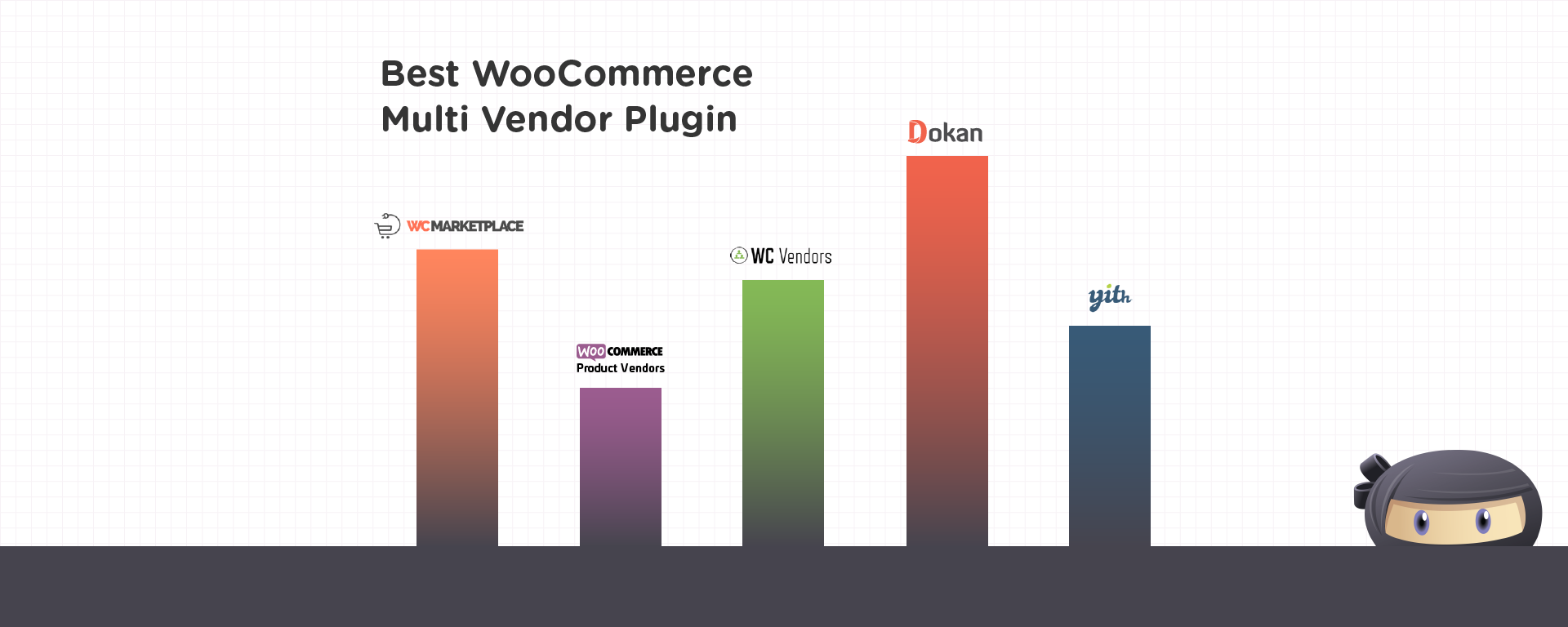
Dokan Multivendor Marketplace

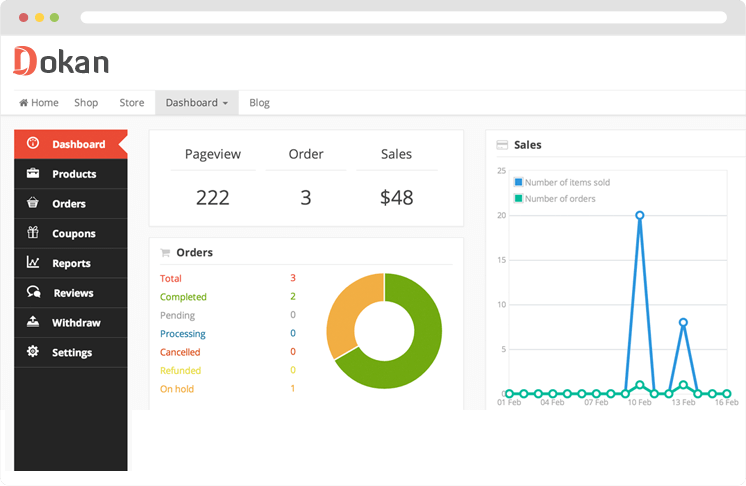
Dokan plugin has become the most popular one with its inclusive features you want. It is the most advanced WooCommerce search plugin.

Dokan Multivendor Marketplace Features Activities
SEO friendly As it is SEO friendly, will help you to make sells regular and increase sales better than before
Frontend Dashboard Admins and vendors can manage stores and save earning reports for further balance check
Easy Withdraw and Frontend Order Management Orders can be easily managed and withdraw request will accept and effective by admins and better for customers
WooCommerce Compatibility This plugin extends with WooCommerce themes and WooCommerce’s  eCommerce competences
Multiple Commission It creates multiple order on categorized stuff
Multilingual System Create your online website through different languages
Various Gateways It offers several payment gateways on altered base
Custom Store URL The newest property of this plugin is admin can customize store URL and with this product level shipping is also possible

Dokan Pros:

  • Dokan has the most powerful and upgrade features for creating a multivendor marketplace in WordPress.
  • It supports the payment gateways through PayPal, Skrill, and Stripe.

Dokan Cons:

  • By way of Dokan has some elites, it will cost you more than other plugins.

WC Vendors

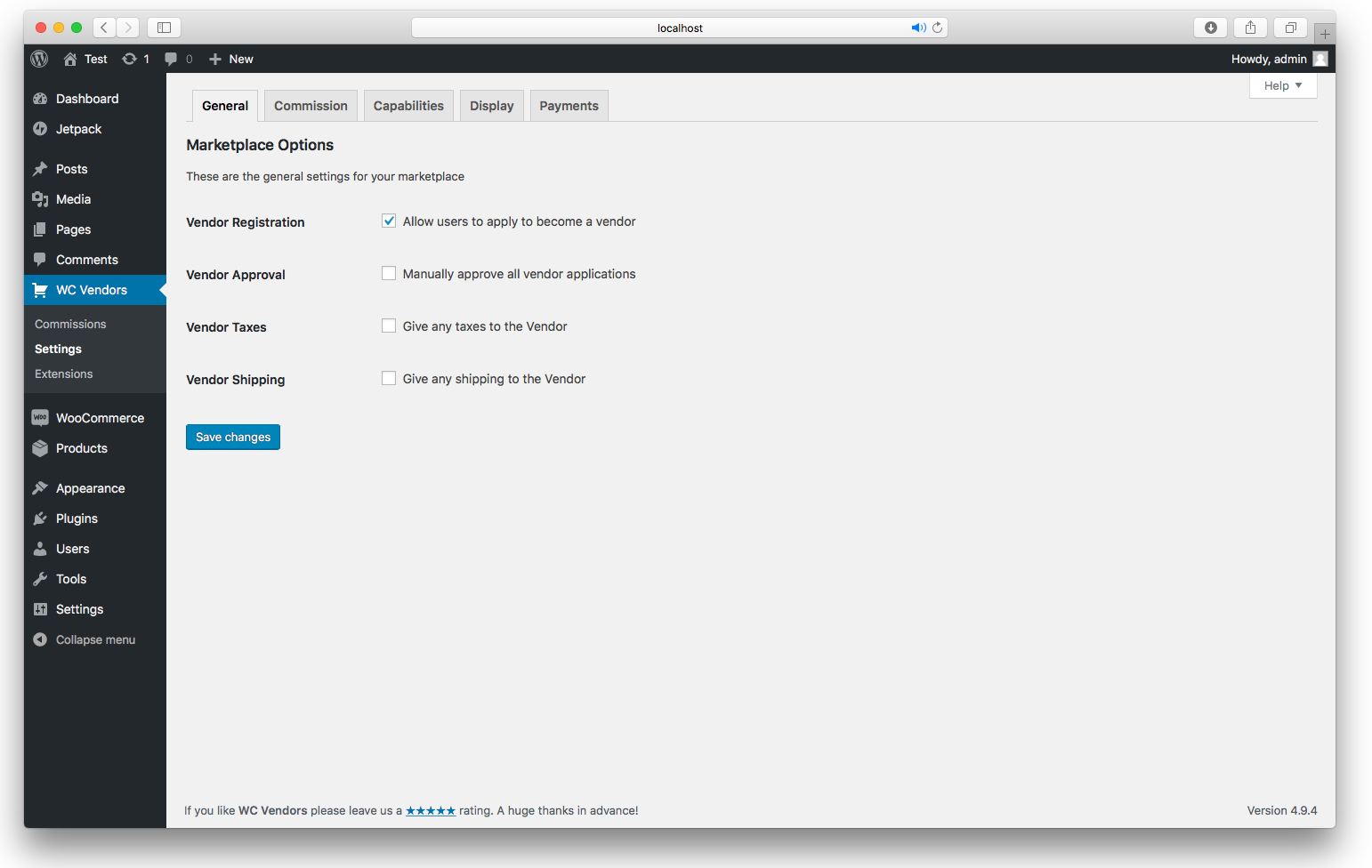
For an outstanding multivendor marketplace, use WC Vendors’ addon. Substituting it with Dokan as if you have a tight budget problem. It offers several similar characteristics like Dokan.

WC Vendors Features Actions
Orders Administration and Frontend Products In vendors’ dashboard, this plugin has some options for- affiliate products, downloadable products, grouped products, private listing option, and tax status. These are editable and admins can control and modify the orders for products easily.
Rating Method and Header Notable Upload facility For excellent branding of vendors’ products in own store’ page and eBay seller page, sellers can choose header banner image and upload it anytime
Generate Coupons and Shipping Expense Set up Who denies coupons? Of course no one. This plugin helps to create coupons in WooCommerce selling the business and set shipping charges for each product
Instant and Easy Payments Strategy For instant payments, dealers use PayPal and Stripe. But once customer will pay for something it cannot be refunded at all  
Discount on Vendors’ sale Commissioner can set the amount and the type of discounts in two ways, fixed fee and percentage fee

WC Vendors cons:

  • Though there is free version trial of this plugin remember one thing, there is no return of money once you have paid for this one.

YITH Multi Vendor

YITH Multi Vendor has some lack of group integrations that make it lower qualified than WC Vendor. WC Vendor and YITH have some common issues like commissions on sale, payment process. But it has some other features like gathering more traffic on sites which increase its popularity.

YITH Features Activities
Multiple administrator details It helps to multiple merchants and along with letting them choose more registered users with their details
Advanced reports Advanced reports are made based on exports, quality users, and vital information about products
Exclude number of products and merchants product limitation Exclude bulk and stock empty products and boundary the number of products for each seller  
Google map for shop location The new version of this plugin has this newest feature and that is to help customers to find the shop location simply

YITH Multi Vendor Cons:

  • If you were unable to create an account on PayPal MassPay, you would not be able to download this plugin for the supplementary procedure
  • No more order management is available in the control panel

MultiVendorX ( Previously WC Marketplace )

Do you want to download free any plugin related to WooCommerce? The answer is MultiVendorX plugin. It has more friendly performances as like as WooCommerce auctions, WooCommerce subscriptions, WooCommerce bookings.

MultiVendorX Features                                   Actions
Director taskbar After finishing your tasks, you will be notified and breeze your site. You will also be notified for approving customers registration, selling products and add products in cart
Dealer review management Admins only approve the reviews about products and services from those who have purchased goods from the eCommerce site
Modifying vendor registration form This plugin suggests admins modify registration form and terms and policies as per requirements in the overall marketplace
Compound payment channel It has instant payment transfer. Moreover, you have payment flexibility opportunity for percentage and fixed amount.

MultiVendorX Pros:

  • It has email and forum maintenance
  • 30 day time no question repayment

MultiVendorX Cons:

  • This plugin does not have WooCommerce booking issue
  • Users face quite a few bugs during customization

Advanced Woo Search

Live search plugin! It will make your web page wonderful. This one is a potent live search plugin. It has some premium version demo identical- infinite amount search form illustrations, results in layouts, and stock status option. Advanced Woo Search has some other features and they are:

Advanced Woo Search Features                      Activities
Advanced setting page It has advanced settings page which is so user kindly with lots of preferences
Stop words option While consumers are searching for products, this plugin has stop words option to avoid unnecessary searching words
Widget and shortcode If you want to replace search box anywhere, conduct widget and shortcode  

Advanced Woo Search Pros:

  • Each exploration results will contain product price and image
  • It is well-suited with WordPress 4.9.6

Advanced Woo Search Cons:

  • It has payment problem with Stripe and PayPal and no free trial

Ambitious and passionate entrepreneurs would like to choose all these plugins to create an online marketplace in WordPress. These 5 best plugins have rocketed WordPress popularity and drawn up it as number 1 CMS in the world. So do not be foolish and even no more confusion, install your one to create multivendor marketplace indeed.

Still confused? Don’t worry! We have experienced consultants who will guide you to take a proper decision! And even we have experts who can help you in building the marketplace. All you need to reach us for help.