Comparing Top Landing Page Building Plugins in 2018

Some certain leaps can change your site show. A landing page is one of those. If you use WordPress for making a website, need a landing page building plugin.

The first step is about the landing page. The second one part will compare different landing page building plugins in 2018.

Landing Page

What does landing page mean to you? Well, it makes you feel like an entry page of a site. If this is important, landing page building plugins also inevitable to generate some.

Comparing Top Landing Page Building Plugins in 2018

Which plugins will create an awesome landing page for a website? There remains a lot. But only a few can have catching profits. Behold the top landing page building plugins.

1. Elementor
I pick up Elementor as first, means the best one. It is both free and premium tool. Check the tutorials on Voidcoders about Elementor.

Why should you choose Elementor:

Grade: A+

Price: $49 for a single site with 1-year services.

2. Beaver Builder
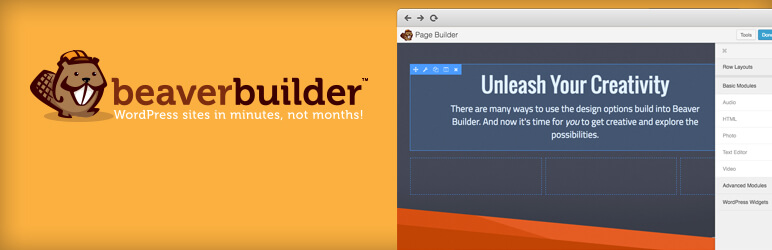
Another top listed landing page builder plugin is Beaver Builder. No coding, the drag and drop interface will generate a beautiful page from scratch for the website.

Why should you choose Beaver Builder:

  • Landing page templates
  • Matching widgets, content blocks and advanced elements
  • Front-end inline editor

Grade: A+

Price: $99 with one year support and unlimited website.

3. Lead Pages

Want to create a high-converting landing page? In that case, Lead Pages is an amazing landing page builder plugin.

Why should you choose Lead Pages:

  • Experts have designed 150+ templates
  • Facebook advertising builder
  • Customizing options
  • A/B testing
  • Marketing tools integration

Grade: A+

Price: $25/month for annual paid.

4. OptimizePress

OptimizePress Reviews 2017

OptimizePress means optimized landing pages. With empowering site, allows making membership without other toolkits.

Why should you choose OptimizePress:

  • 40 types of custom stuff
  • Quick email marketing services integration
  • All currencies of payment acceptance

Grade: A+

Price: $97 with 3 websites and one-year free service.

5. Divi Builder

Elegant Themes has created Divi with stunning pre-made themes. Unlimited design possibilities come with Divi.

Why should you choose Divi:

  • Easy access to Divi if the user has an Elegant Theme
  • The user can reuse 30+ ready-made templates
  • Intuitive landing page editor

Grade: A

Price: $99 per year for the limitless website.

Final Thought

Considering above landing page building plugins, Elementor is the best. The empowering configuration clears that why Elementor is better than others in the market. The main attraction is its compatibility. Elementor Pro is also fast and intuitive in this race. In recent, included opt-in forms and pricing tables will make webpage preparation easy for customers. I have mentioned my choice. You can choose your one considering the budget plan.

For any query please comment below.
Empower SEO: WordPress Categories vs Tags You Prefer?

Statistics say that over 26% of websites have built by WordPress. Surely, more websites are increasing with the number of users. Among them, the most debated issue is categories and tags.

Categories and tags are similar in organizing your website. There are more similarities between categories and tags. Do you want to know?

WordPress Categories

For instance, WordPress V2.5 only had categories. On the blog widgets, categories mean to describe the base of a topic. How can user add different categories for specific terms?

  • Click on WordPress account > Dashboard
  • Again, Writing settings > Default post category

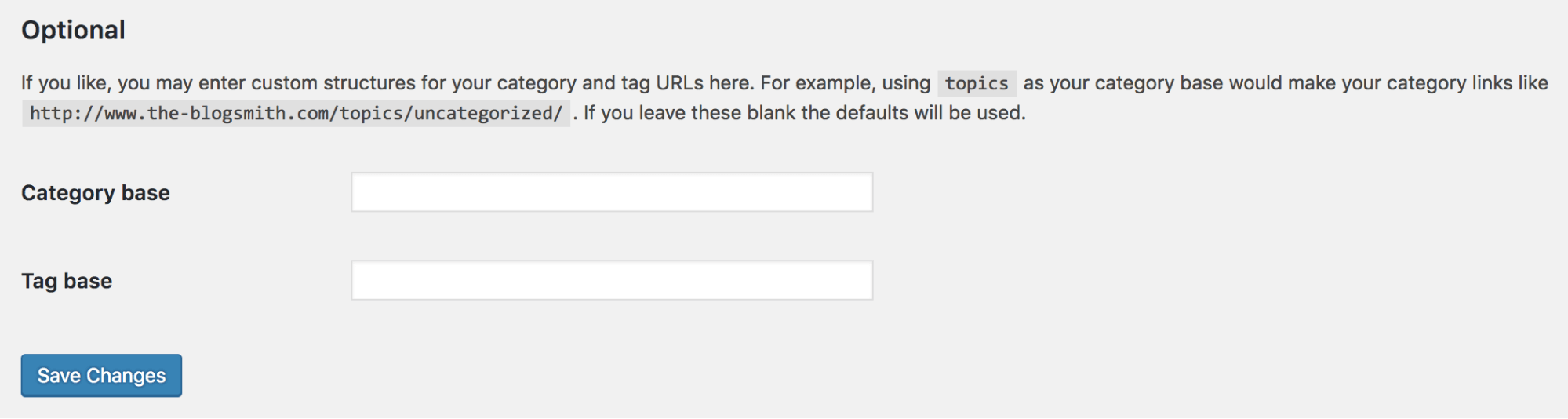
  • Also in Permalink Settings, edit category and tag by entering custom URL

Best usage of WP category

  • Create categories as your blog posts increase.
  • Keep on immense research of keywords after select a topic.
  • Index articles and SEO empowering depend on category’s archives. Here are a few steps to work around it:
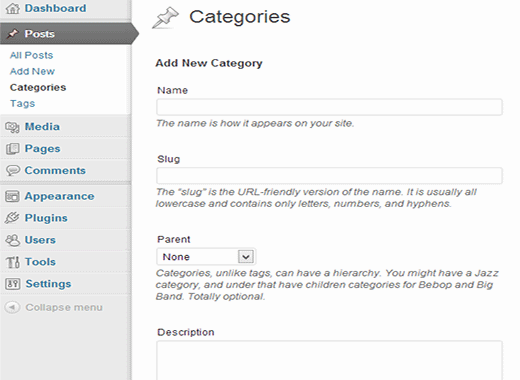
  1. Click on Posts > Category Page. Include name and description in Add New Category.
  2. Again press on Posts > Category > Edit. In this case, edit name, URL and description and save.

Above ways are applicable when themes aren’t allowing to add a description.

WordPress Tag

Time to illustrate on WordPress tags. The tag is convenient for separating each blog post according to the illustration.

Best usage of WP tag

  • Use much more referred tags to specify the topic.
  • Unlike categories, no need for research on keywords. Such as, add Hair Dryer tag in hair dryer related post. When people search in Google, your content will appear.
  • No Index option for tags will prevent duplicate stuff.

Empower SEO: WordPress categories vs tags


In case of empowering SEO, WordPress tags and categories both are important. But which one do you prefer?

Have a closer look on categories vs tags.

Categories Tags
Categories use for extensive grouping of posts. Tags bring out details of each part of a post.
Readers find content at ease by categories. Tags cannot help in finding contents.
Categories are a big fact for SEO ranking. Tags cannot assist posts on accelerating in SEO ranking.


Yoast SEO is both free and premium plugin. Yoast will collaborate in SEO ranking. Also, it shows the options for using categories and tags.

Wrap Up: Categories vs Tags

Tags and categories are both default taxonomies. From one side, tags indirectly improve SEO. On the other hand, categories promote SEO directly by identifying themes.

Higher SEO ranking depends on your choice. Enhance your blog posts.

Happy blogging!

Image Optimization- 100% with Free Plugins in WordPress 2019

This new era demands images as a mandatory section in web designing. Alike in an eCommerce website, customers order their preferred products by observing the images.

A higher number of customers will attract to a website with greater performance. Do you have any idea about the importance of image optimizing?

According to The Fiscal Times statistics, “ on average, websites are 2.5 MB in size which was about 1.5 MB in earlier days.” Bigger files of images grasp around 1312 KB of 2087 KB. With the description of image optimizing, will provide notions on adjusting pictures step by step.

Ideas for image optimizing

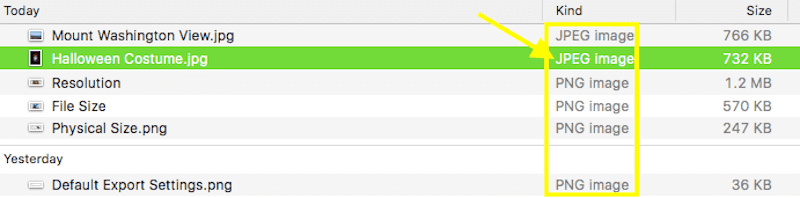
  1. File type: The file format of images is a big fact. Give importance on below formats:


  • JPG: is the normative file type. Compress files and manage photographs in short sizes. As a weakness, it does not assist transparent background.
  • PNG: suitable for designing elements on a website. With original data impact, PNGs compress pictures a little bit.
  • GIF: is an alternate of videos and attractive to readers. As a lightweight file type, use in WordPress at ease.


  1. Physical size: Device is an issue at present. Physical size determines the picture looking on your WordPress.

3. Resolution: Dots Per Inch (DPI) refers to the measurement of the resolution of an image. Lower DPI causes lower folder size. Attempt to keep 72 pixels as a standard resolution.

Image Optimizing Free Plugins in WordPress 2019

Now you will introduce with top free image optimizer in WordPress.

1.      Smush Image Compression and Optimization

The Smush plugin has created by the most popular corporation WPMU DEV. A little bit differences between the premium and free ones. Get a free membership of WPMU DEV from buying the premium one.

Notable Features:

  • Large folders of images become smaller after upload.
  • Compress photos in gallery plugins, theme folders, media files and offline cloud storage.
  • No API configuration needs.
  • Photo compression statistics are available.

2.      EWWW Image Optimizer

This plugin uses the unique algorithm system. Since algorithm provides lossy compression to pictures remain solid quality.

Notable Features:

  • Automatic constriction method allows you to practice elsewhere in WordPress site.
  • Bulk optimizer manages to skip already constricted images.
  • Like smush plugin, this optimizes all media folder. Including theme images, slider photos and big icons.

3.      Compress JPEG & PNG Images

Want to make your site faster than before? With making the site faster, serves customers in a better way.

Notable Features:

  • Preserve copyright metadata.
  • Speed up workflow with advanced background optimization.
  • Color profiles decode to RGB color.

What Have We Learned?

Above plugins provides the similar services. Choose a tool that helps to optimize images and speed up your site. Also, remember of your server space. A plugin should be utilizing for server space. Use the best and reliable one for the website. High-quality photos can attract your customers more than anything.

How to Start a Profitable Drop Shipping Business?

Drop shipping has become very popular at present. Whoever related to eCommerce business, are known to profitable drop shipping terms.

For instance, store head neither wants to raise an inventory nor physical works for packaging. If he wants to accelerate shop as worldwide brands, drop shipping is perfect. What more does it offer user?

Do you have you any idea for starting a profitable drop shipping business? Let’s find the answer to our newbies.


How to start a profitable drop shipping business?

The below will consider as the steps for starting a profitable drop shipping trade.

1.      Build an eCommerce website

First, open an eCommerce website for starting a profitable drop shipping trade. In recent articles, all details of the eCommerce site have included in 4 parts:


2.      Pick a niche

Sell which are not available in local: Sell something uncommon in a local street. Another strategy to attract potential buyers.

Attract people for products: Payment gateways, coupons and other facilities can stretch out worldwide customers.

Seek catching profits: A $20 item is necessary. But $1500 worthy good is the most demanding. So you should seek buyers acquisition and advertise on the store.

Product’s price = disposal income: People want to buy stuff which is equal to disposable income. Have concern of equality in price and stuff.

Create own brand: By the contiguity of all sectors, try to create own brand with own creations.


3.      Enact strip research

The store opening is not enough. With this, responsibilities will increase to represent store as perfect to people. Profitable drop shipping is perfect but can’t make your store perfect. Giant retailers sometimes fail to achieve profitable drop shipping operations. Enact strip research increase knowledge about product, price and demands of people.

4.      Ensure safe suppliers


What can a wrong supplier do? Harm products, ruin profitable drop shipping business and decrease customers. In short, they can ruin the way to profitable drop shipping trade. To avoid these, do the followings:

  • Regular communication
  • Clear dues
  • Keep details of suppliers

5.      Analyze and optimize

Customers regularity checking has become very easy now. Google analytics dashboard plugins provide great services in this purpose. But how can you understand that which ones are potential and not? Email subscription is the best way. Contact form plugins keep information of customers. Saving reviews about store services and products. This method can determine your profitable drop shipping business at a better stage.

What have we learned?

When a user can track store’s customers, suppliers and products can lift up an eCommerce business. Though here the topic is how to start a profitable drop shipping trade. Wrong marketing solution and fake advertising can decelerate your profitable drop shipping business. Follow the above instructions for achieving a better position.

If you are a beginner, start your FAQ in the comment section below.

Comparison between the best eCommerce Hosting Platforms

Hope you have already started your online business. Our articles on the guidance of eCommerce business and start-up costs might have helped much.

Choosing the best eCommerce hosting platform from all is a tough task these days. As always I will help you to select the right one for your eCommerce business.

Let’s dive into the deeper to opt out the perfect one according to your website.

Comparing the eCommerce Hosting Platform Options in 2018


Your website building was never been so easier. But choosing the right eCommerce hosting platform can minimize your suffering. Here below, comparing the eCommerce hosting platform options in 2018.

Shopify

Which eCommerce hosting platform has achieved the leading position? Shopify is the leader in eCommerce hosting platform options. Why?

With the above features, you surely want to have a trial. Yes, Shopify offers a 14 days free trial.

WooCommerce

WordPress is an open source blogging platform. Besides, WooCommerce is the most favorite one in eCommerce hosting platform options. Web developers recommend WooCommerce as this is easy to hook up with WordPress. In the previous article, I have added guidance on how to create a marketplace with WooCommerce. Voidcoders has included WooCommerce plugins to fewer users work.

Key points to remember about WooCommerce:

  • Based on WordPress with the easy content management system
  • Gateways and comfortable payment integration
  • Coupons code
  • Email marketing

WooCommerce is a default choice if you have decided to generate a website with WP.

Wix

Can Wix be the user-friendly eCommerce hosting platform option?

Yes. It is the right personal solution among eCommerce hosting options. Without any technical knowledge, the user can create a high-quality website.

Key features of Wix:

  • Tons of templates in the template library
  • Free user plan
  • HTML 5 editor
  • The easy online payment system
  • Great UI with drag and drop configuration

Visit Wix to integrate and have a free trial.

BigCommerce

BigCommerce has aimed to fast-developing brands as a cloud-based platform option. With lots of customizing features, BigCommerce offers you-

  • Product order and delivery ensuring
  • Payment integration
  • Multiple currency support
  • Special UI

Perhaps you want a free trial, BigCommerce assures.

SquareSpace

SquareSpace has similarity with WooCommerce. Templates library which leads up developers to eCommerce hosting as with visual website builder. This is the reason why SquareSpace is one of the most powerful eCommerce hosting platform options from 2004.

Key features of SquareSpace:

  • Attractive and ready-made template design
  • Affordable
  • No extra transaction fees
  • Available analytics of customers

The above features might have imposed you to give a trial of SquareSpace eCommerce hosting platform option. Grasp it if this fulfills your conditions.

Wrap up


  Shopify WooCommerce Wix BigCommerce SquareSpace
UI Yes Yes Yes Yes Yes
Loads of apps Yes Yes Yes Yes Yes
Templates Yes Yes Yes Yes Yes
Multiple currency support Yes Yes Yes Yes No
Extra fees Yes Yes No Yes No
Analytics Yes Yes Yes Yes Yes
Email marketing Yes Yes Yes Yes Yes


The above eCommerce hosting platform options have sorted by their using positions.

In modern times, shoppers use different devices and channels in their buying pathway. Your eCommerce site won’t increase if the customers dissatisfied. Choose the best eCommerce hosting platform option to make your site as a growing brand.

Analyzing eCommerce Hosting Platform and Pre-requirements

In earlier, we have analyzed how to create a marketplace in WordPress using WooCommerce. It is time to analyze how to expand your open source business using the eCommerce platform.

The procedures are much easier when you will step forward to set up. Let’s jump to the next part to amplify your knowledge.

eCommerce Hosting Platform


What is eCommerce hosting platform? Any guess?

The “e” represents for electronic. Thus eCommerce is a website hosting platform that serves electronic commerce website. In short, all website hosting services related to commerce offered by eCommerce.

But why do a businessman use it to enlarge business?

At present, everything is going through online. The enterprises don’t offer cheap services. However, they require a huge amount and a proper team. As it’s a business aiming discussion, the whole eCommerce trading team should aware of expanding the business task.

Pre-requirements of eCommerce Hosting Platform


To run projects based on an eCommerce hosting platform predicts a long-term issue. The longer-term requirements you select, the business will relate to the right eCommerce platform.

Considering this process, the user may have some inquiries. For instance:

Design and UX: core user roams around templates and other components of front-end of the site.

Content quality and management: the ability to stage content, content blocking and page building should be qualified to publish.

Integrations: all types of integrations like third-party CMS, data transfer through API connection and webhooks.

Promotions: loyalty programs, reduction, reward points, marketing initiatives, tracking, SEO and so on.

Payments: data imports and data clarification about user need for payments.

Catalog management and tags: catalog setup, products price including types are the required things.

The next approaches are the requirements based on platforms. Enjoy this.

Customer focused platform

The most feedbacks come from the customers who have subscribed in your site. The more your site visitors increase, the longer your business will last. Such things you have to control for increasing visitors-

  • Advanced content management
  • Advanced and filtering
  • Plugin learning regarding product marketing, listing according to price
  • Customer segmentation

Magneto Commerce has common features like Salesforce Command Cloud (Demandware) has. But the difference is in their offers. The first one deals in a flexible way but the second one is out of the box. So the customer-focused platform with the consultancy of third-party makes solutions available.

Platform process requirements

How the different tools fit with your website to stack up with the competitive market. Find out the relevant team for better overhead. As like PHP developers consider moves to Shopify, Salesforce Commerce Cloud.

Technical integrating necessities

If any tool has vigilant features, will impact on cost and thus project. Retailers try to use a platform that can fulfill their demand. A bundle of customization tasks can elevate to accomplish traits.

For instance, in the case of integration customization. How?  SFTP method is the solution. We also endorse an iPaaS or a middleware platform.

Headless eCommerce related to De-coupling methods

The term headless eCommerce tactic has enormous in last few years. Usually, it is a system to serve content. Users choose this from front-end of the store to integrate with back-end elements.

Multiple specialist systems integration is a creation from micro-services. Elastic Path, Moltin and Sylius are the instant examples of using this part.

Final Thoughts

Keeping above in mind, the user should remember that which fundamentally achieve market objectives. We have not mentioned the cloud platform indeed. The process relaxes users about platform control, server maintenance and security. So have a trial of each one platform with a wise choice. Lead the methods to achieve eCommerce business objectives.